Set up VibeiDE in 3 minutes
Install the app, connect the AI coding tool you already use and queue one safe, read-only task. Your first result lands in Ready for review.
VibeiDE is a desktop app.Open vibeide.dev on your computer to download and get started.
Download VibeiDEStart the walkthrough14-day free trial. No card required. Provider subscriptions and usage are separate.
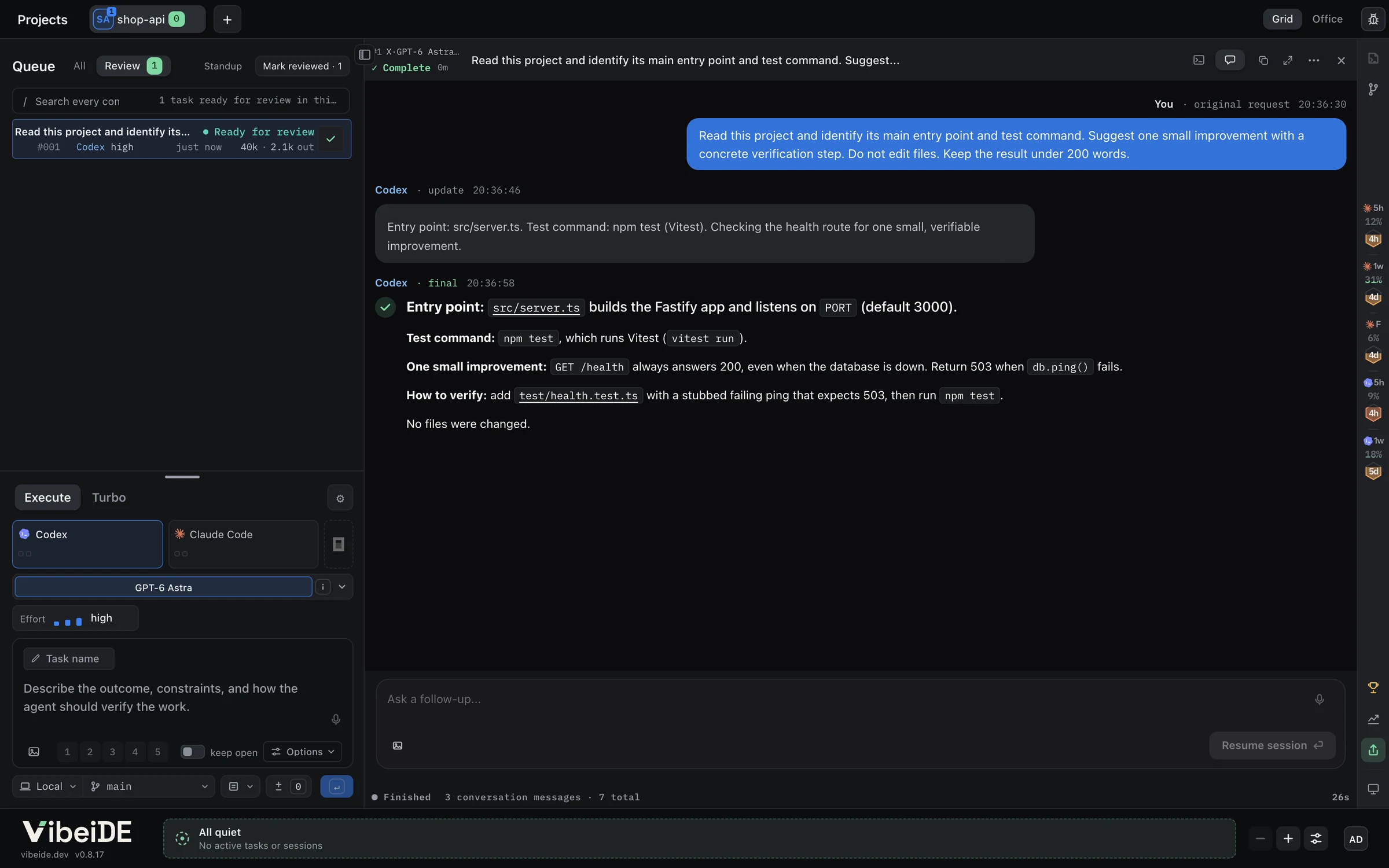
- Ready for review
- The agent’s answer
Where you are at 3:00. Example project and output.
Before the clock starts
The three minutes assume these are ready.
One AI coding tool
Codex, Claude Code or OpenCode, with your own account. One is enough. A provider’s desktop app alone does not count: VibeiDE runs the command-line tools.
A project folder
A local repository you know well, so you can check the agent’s answer. The first task only reads it.
A minute to sign in
You sign in with Google or email to start your 14-day trial. No card required. VibeiDE needs internet access for that first sign-in.
Nothing installed yet? VibeiDE installs Codex, Claude Code and OpenCode for you in step 2. The download and the provider’s own sign-in add a few minutes.
Download and open VibeiDE
Get the installer for your computer from the download page, then open the app.
Tip Look around before you sign in if you like. Agents only start when you queue a task.
Windows
Stable
Run the Setup installer to install VibeiDE.
Download SetupThe first installation may show “Windows protected your PC”.
Connect your AI tools
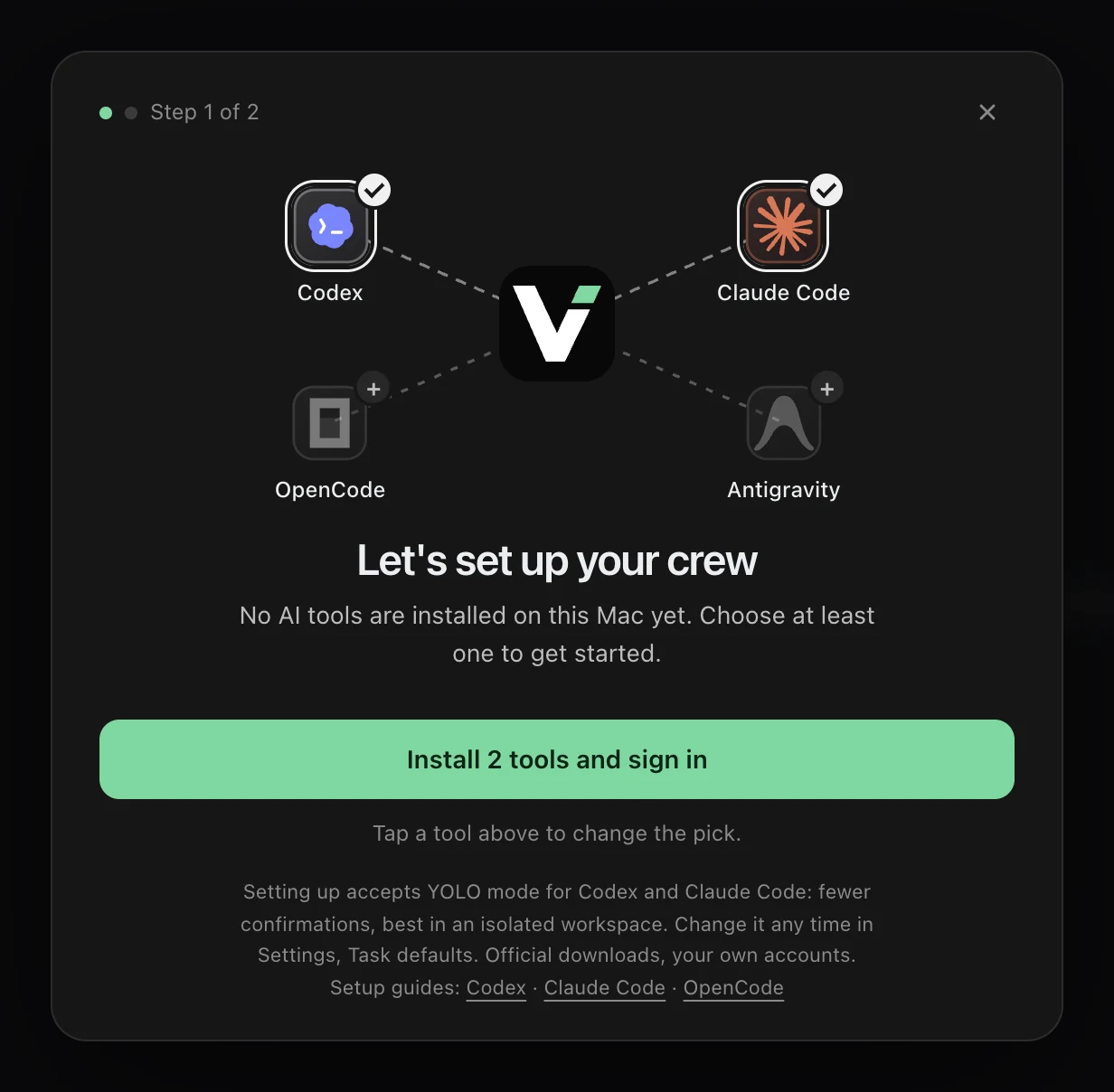
On first launch, VibeiDE looks for Codex, Claude Code and OpenCode on your computer. If none is connected yet, the AI tool setup opens by itself.
Codex and Claude Code are picked for you. Tap a tool to add or remove it, then start the install with one button. VibeiDE downloads each tool from its official source, then opens its sign-in in a terminal window and your browser. Finish signing in there, and VibeiDE notices by itself.
One connected tool is enough. When setup finishes, VibeiDE continues to the workspace by itself after three seconds. Press any key to stay, or choose Continue to VibeiDE when you are ready.
Tip Already signed in to one of these command-line tools? VibeiDE reuses it and skips this step. Add more tools any time in Settings, on the Agents tab, under AI tools.
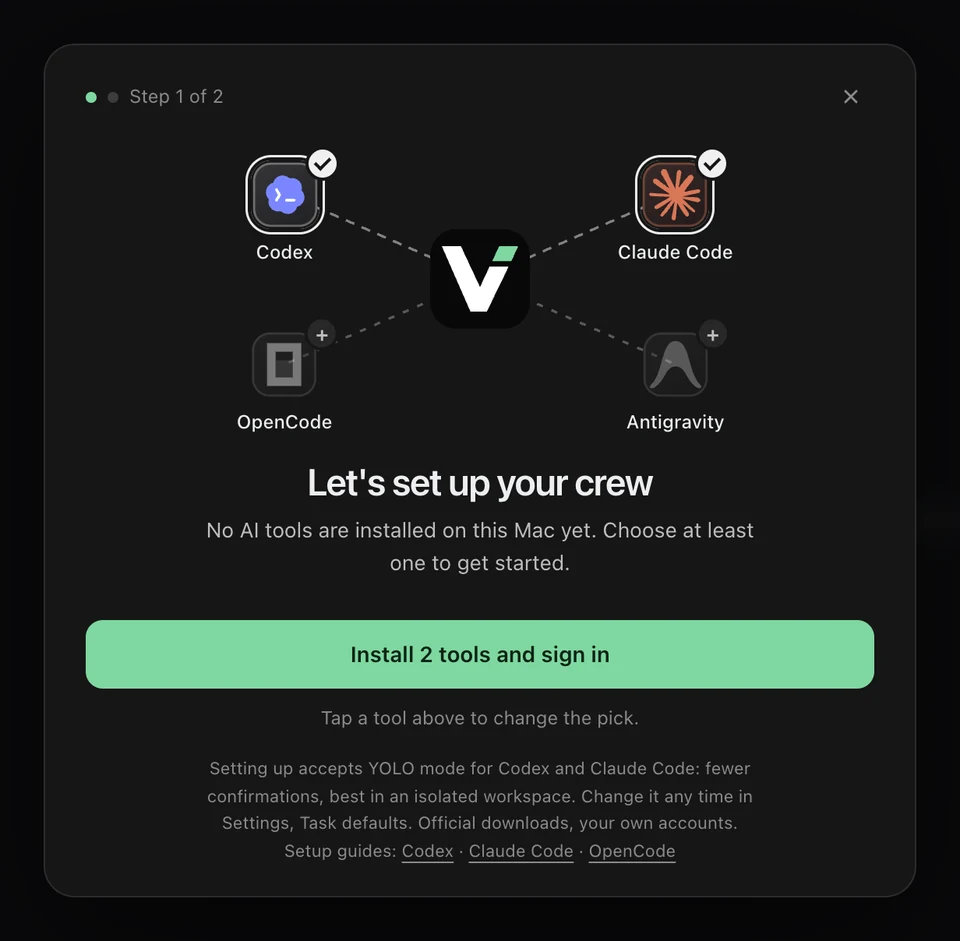
Codex and Claude Code are picked for you. Tap a tool to change the pick.
Sign in to start your trial
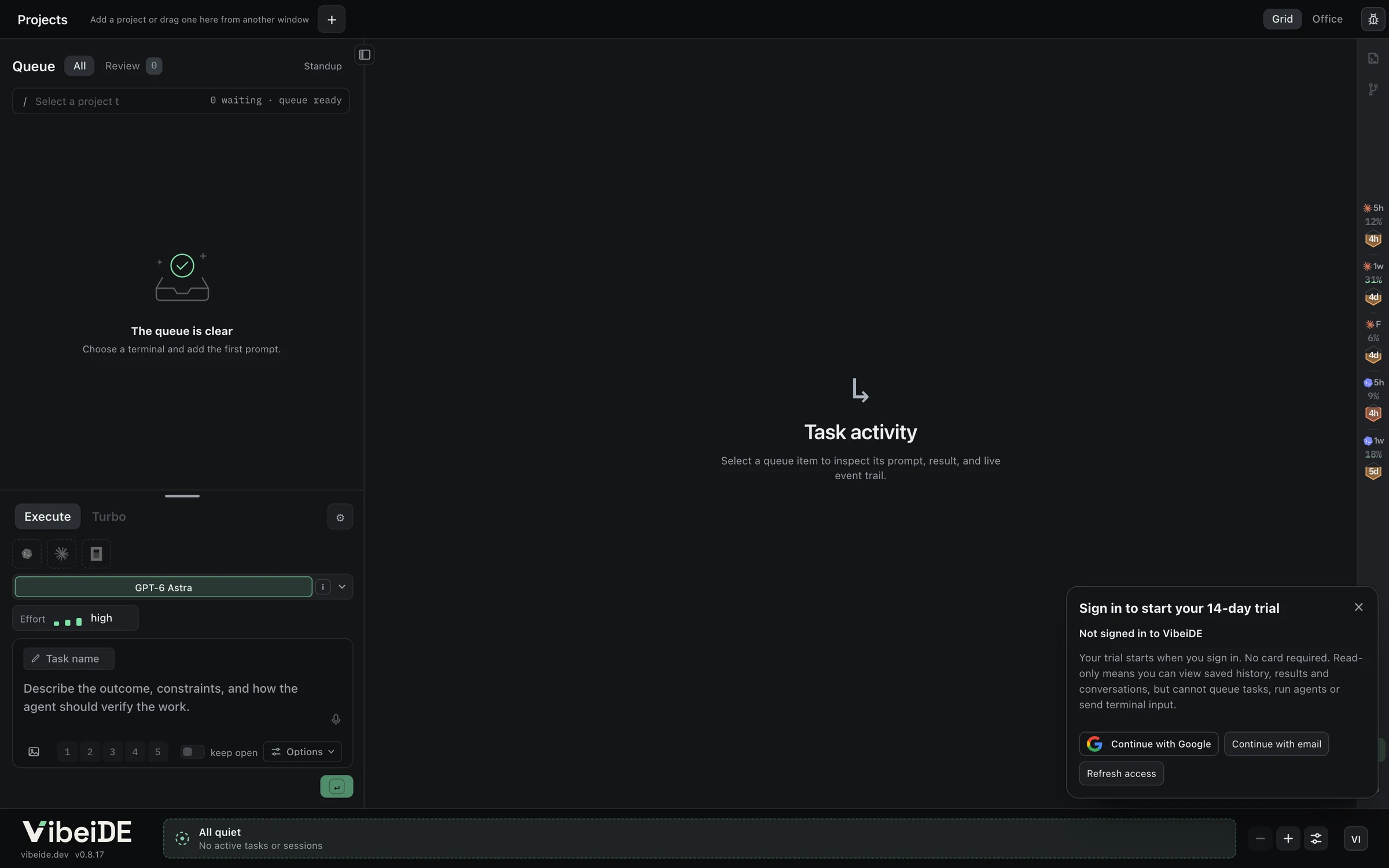
A card in the corner of the workspace starts your 14-day free trial. Choose Continue with Google or Continue with email and finish in your browser.
Your browser hands you back to VibeiDE, which picks up the sign-in by itself.
Tip Signed in, but the card is still there? Choose Refresh access. VibeiDE also checks again every 20 seconds while it waits.
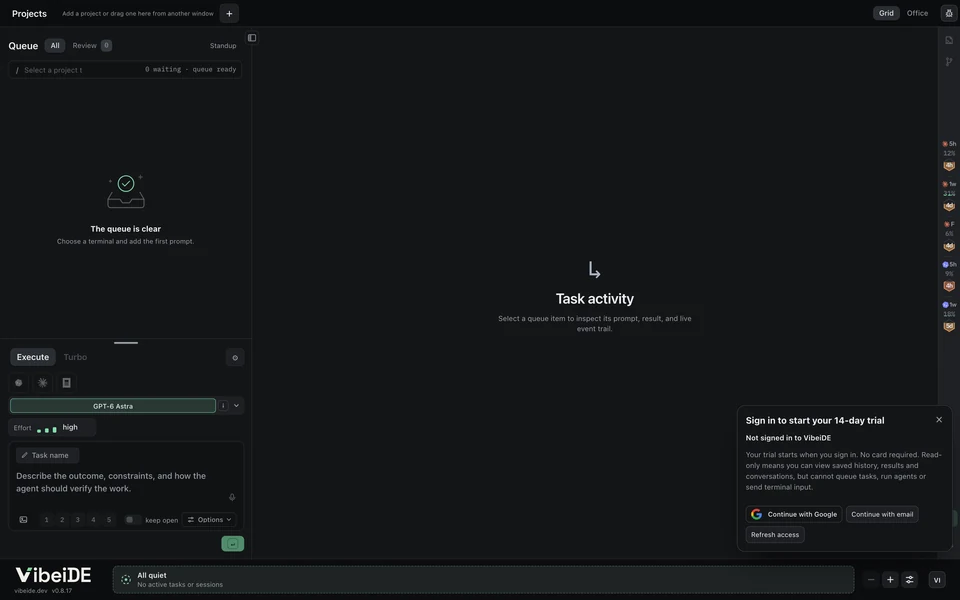
- The sign-in card
Until you sign in, you can look around the workspace, but agents cannot start.
Queue your first task
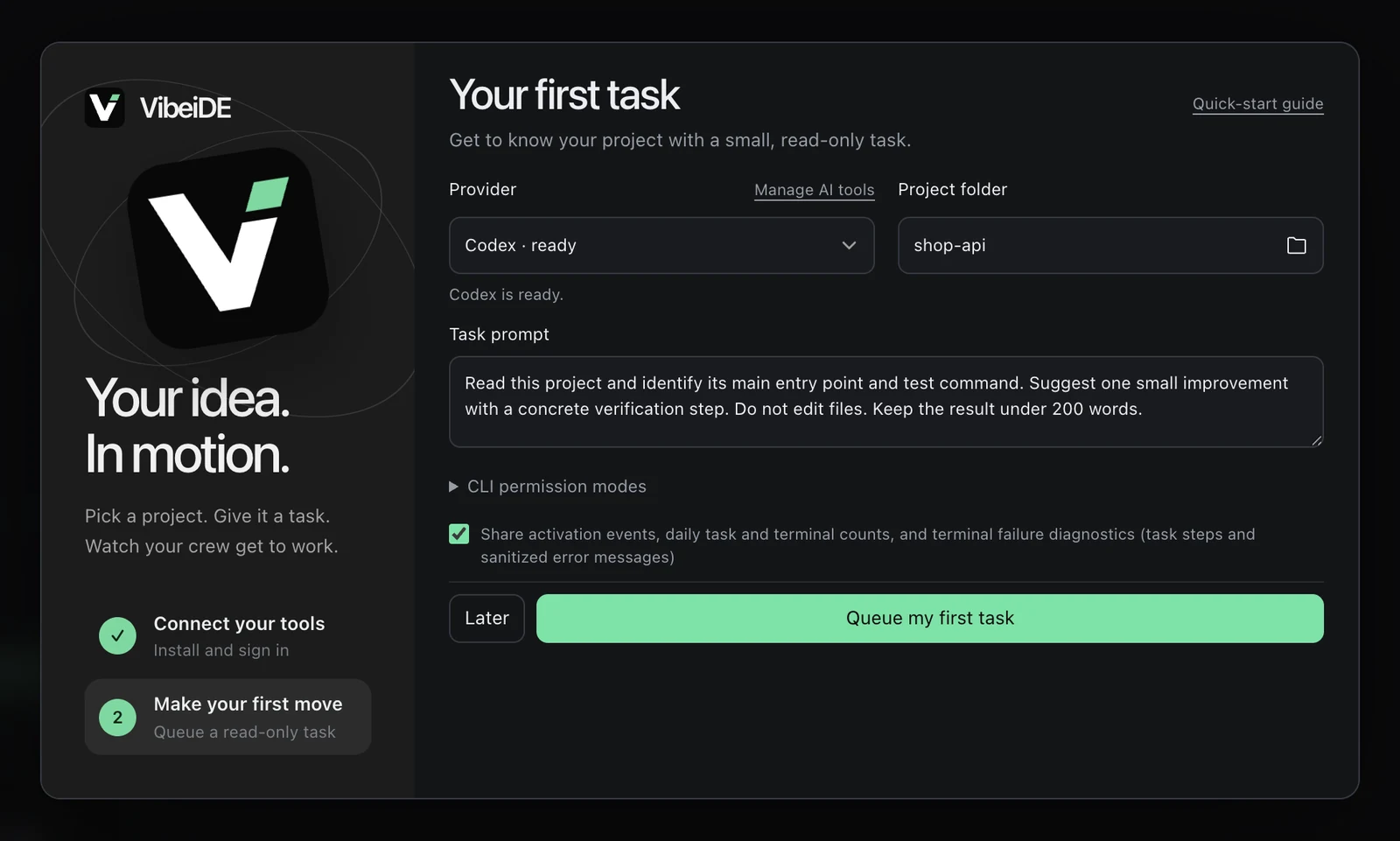
Once you are signed in, Your first task opens. Pick a provider marked ready, choose your project folder and keep the suggested prompt.
Read this project and identify its main entry point and test command. Suggest one small improvement with a concrete verification step. Do not edit files. Keep the result under 200 words.
Then choose Queue my first task. The prompt asks the agent to read and report, without editing files.
Tip Codex and Claude Code start in YOLO mode: full access, fewer prompts. In a repository you do not know yet, pick Read-only for Codex or Ask permission for Claude Code first. You can change it later in Settings, on the Task defaults tab.
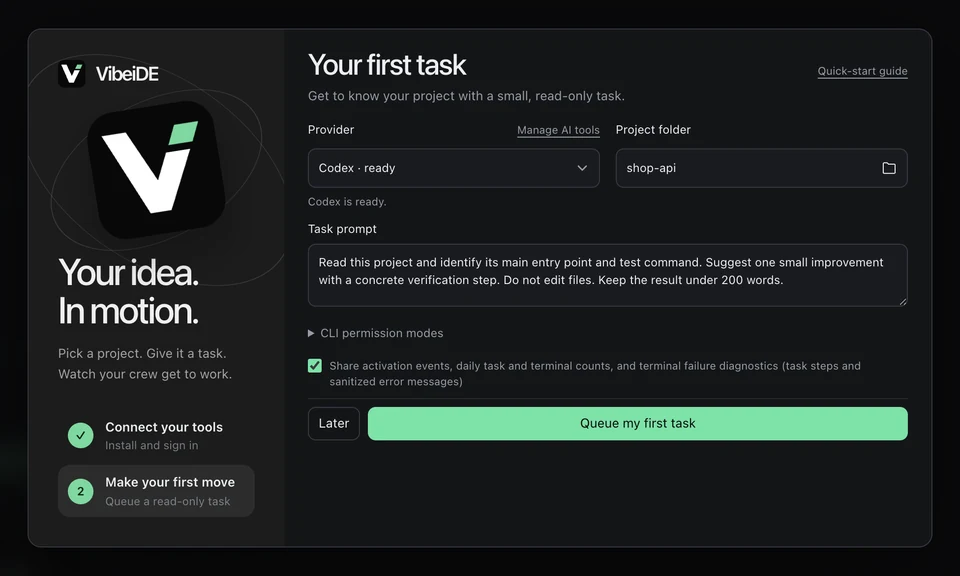
Codex is ready, the project folder is chosen and the prompt is filled in.
Watch it work
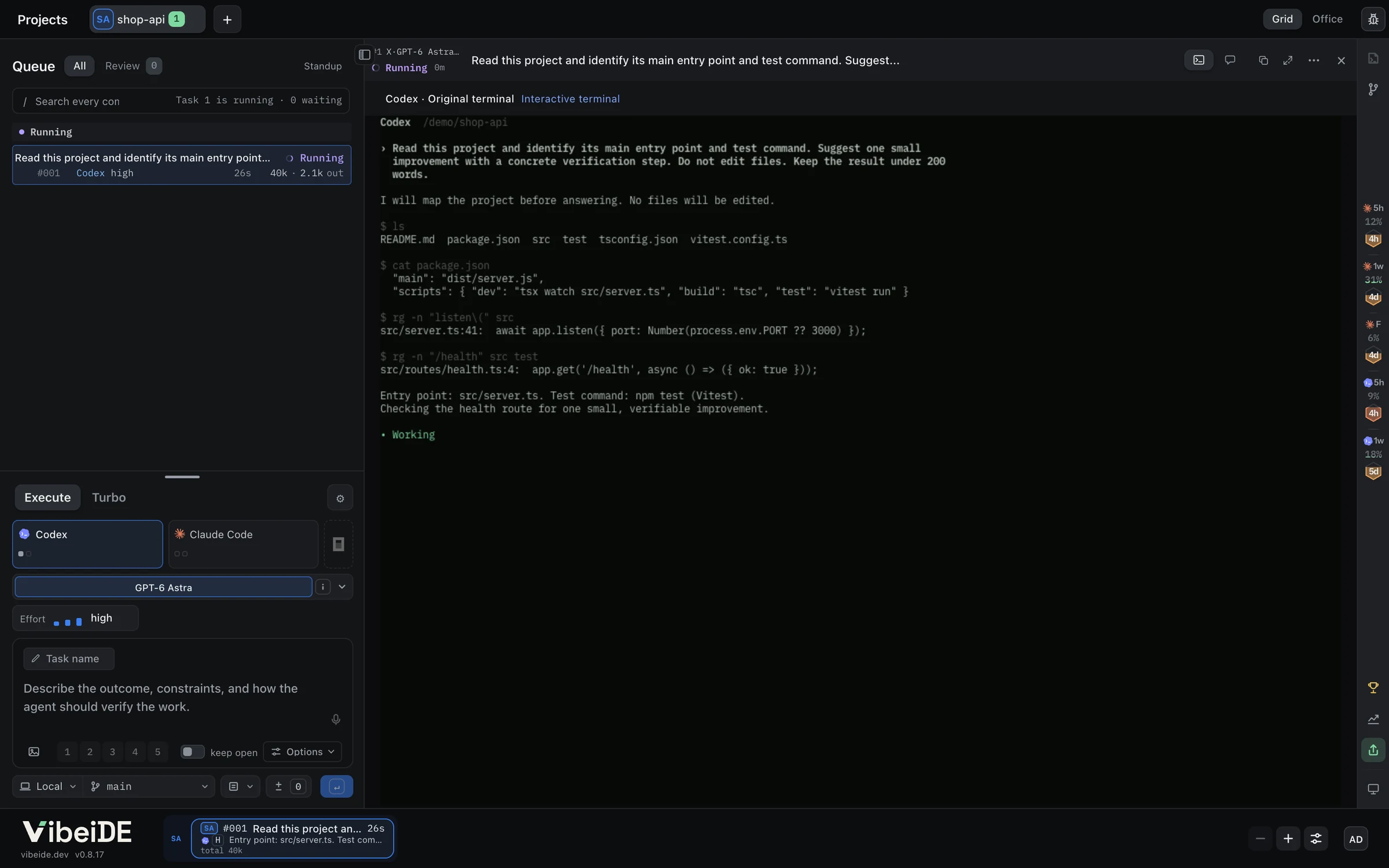
The task appears in the project queue and starts as soon as its provider has a free slot.
Codex and Claude Code run in their original terminal interface inside VibeiDE. OpenCode works in the background and reports in Chat. Switch between Terminal and Chat at any time.
Tip The monitor along the bottom of the window shows every running task, across all your projects.
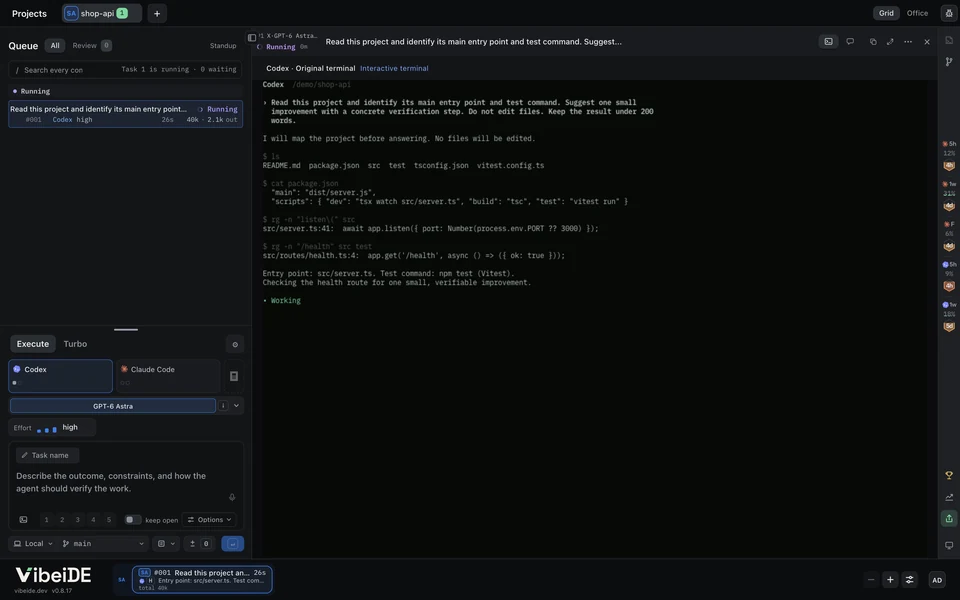
- Your task in the queue
- Codex reading the project in its own terminal
Example project and terminal output.
Review the result
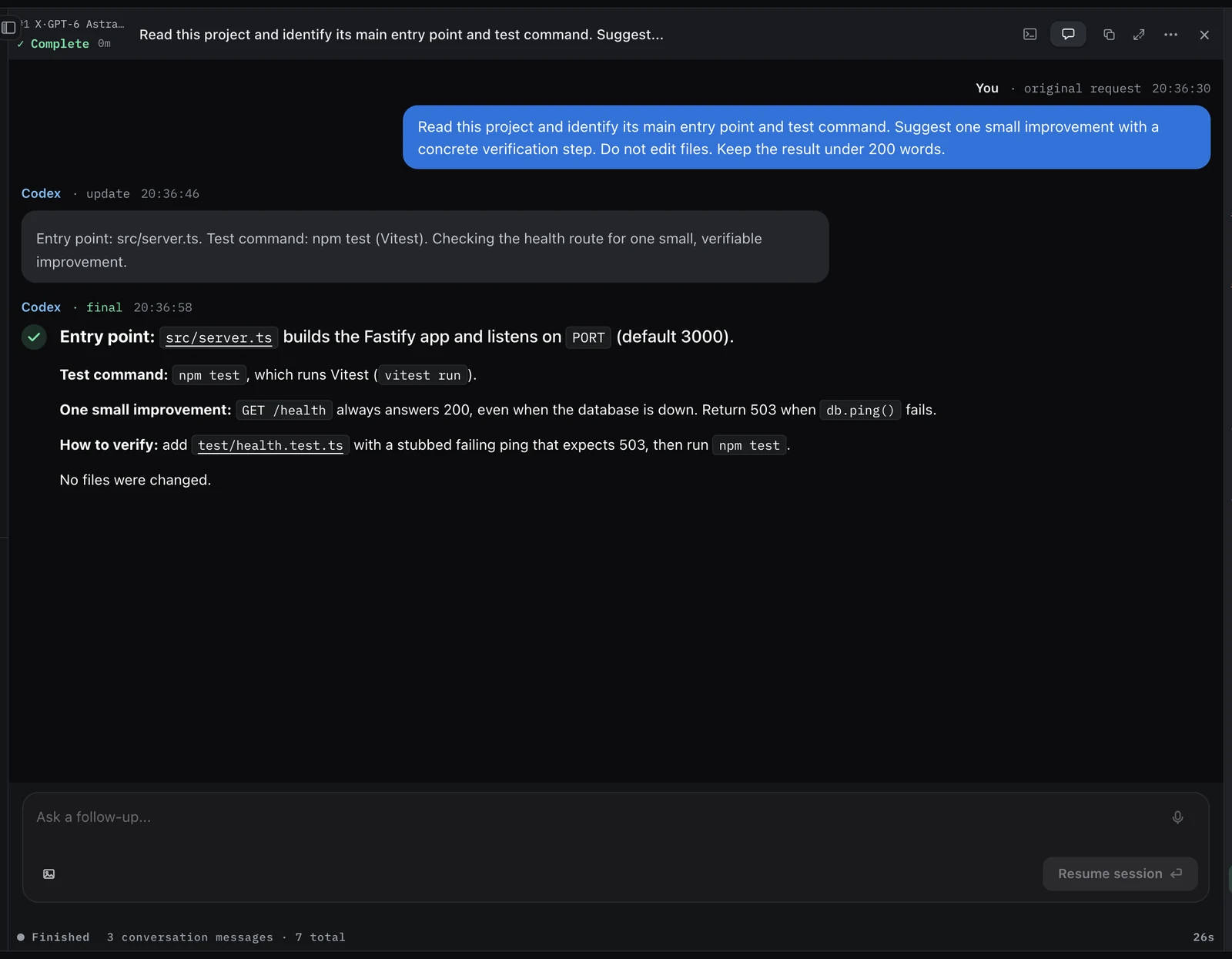
When the agent finishes, the task moves to Ready for review. Open it and check the answer against your project.
Mark it reviewed with the check button when you are done. Reviewing clears it from the list and never approves, merges or commits anything.
Want a change? Ask a follow-up, and the agent continues the same conversation with everything it already knows.
Tip Most first results arrive within a few minutes. Provider speed, sign-in and the size of your repository can stretch that.
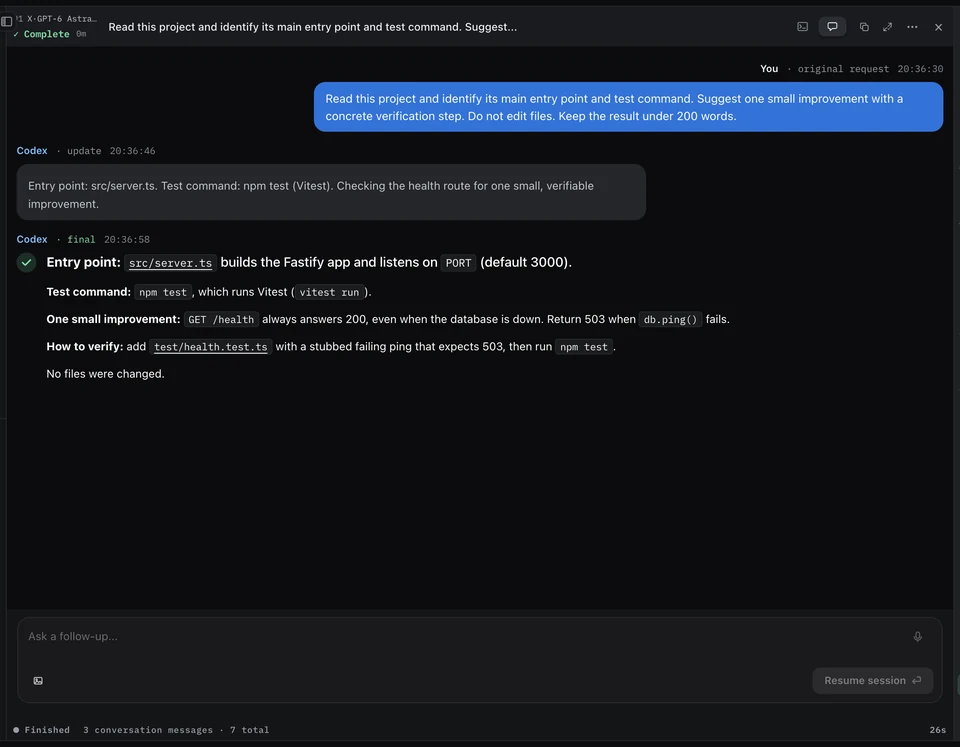
The answer names the entry point, the test command and one improvement you can verify.
Tips for your next tasks
Habits that make every task after the first one easier to review.
Write tasks like tickets
Say what done looks like, what must not change and how to check it. Then the agent can verify its own work, and you can review it quickly.
- Outcome
- What should be true when the task is done.
- Limits
- What must stay as it is.
- Check
- The command or test that proves it.
Paste or drop screenshots and files into the prompt when words are not enough. They go to the agent with your task.
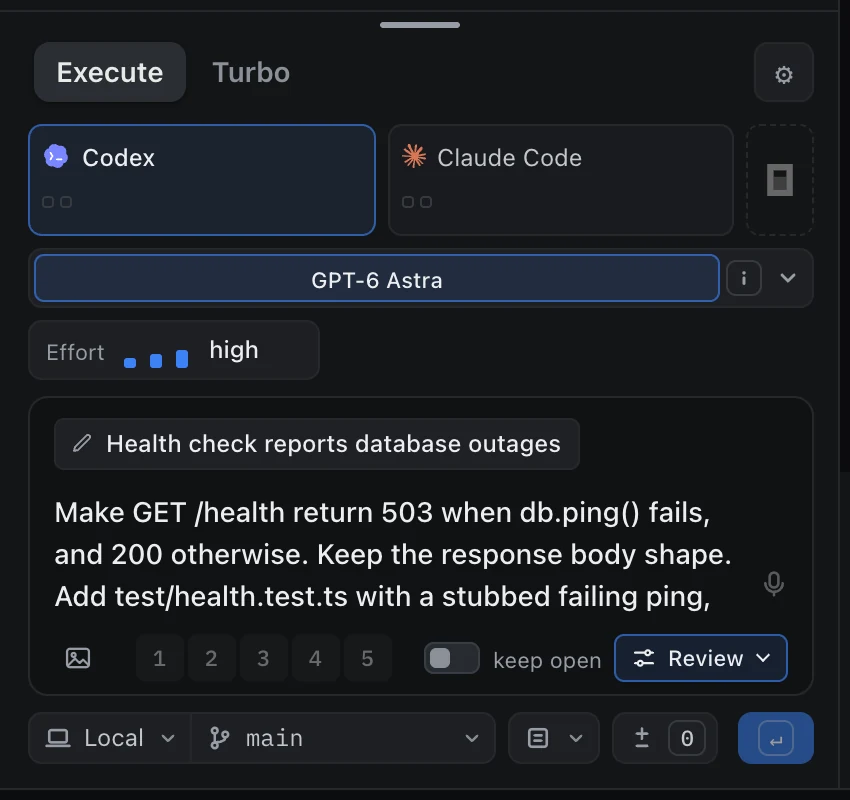
A named task with a clear outcome, a check and Review code turned on.
Queue from the keyboard
Enteradds the task to the queue andShift+Enterstarts a new line.Ctrl+Enterputs the task ahead of the ones waiting.Pick a parallel limit
Each provider card sets how many of its tasks run at once in this project. Start with one or two. Extra tasks wait in the queue and start when a slot frees up.
Give parallel tasks their own worktree
Two agents editing one checkout can collide. Choose New worktree per task under the prompt, and every task gets its own worktree and branch.
Let the agent check its own work
Turn on Review code. After the task, the agent reviews its change for bugs and edge cases, fixes what it finds and verifies again.
Plan the big changes first
Plan council has one agent draft a read-only plan and a second provider challenge it before any code changes.
Mind your usage windows
The header shows your Claude and Codex usage and when each window resets. VibeiDE works within your provider limits and never bypasses them.
If something gets stuck
A tool says Not installed or Sign in needed
In Settings, open the Agents tab and choose Set up next to the tool under AI tools. VibeiDE installs it if needed and opens its sign-in. Prefer your own terminal? Sign in there, then choose Check again.
- Codex
codex login - Claude Code
claude auth login - OpenCode
opencode auth login
Queue my first task stays disabled
Choose a project folder and a provider marked ready. If you just changed a permission mode, wait until it shows Saved.
I signed in, but VibeiDE still says Not signed in
Choose Refresh access on the sign-in card. VibeiDE also checks again whenever you switch back to its window. If it still fails, check your internet connection.
My task stays Queued
A task starts when its provider has a free slot in that project. Wait for a running task to finish, or raise the limit on the provider card.
Branches and worktrees are missing
They need Git on this computer. Choose Install Git when VibeiDE offers it, or install Git yourself and restart VibeiDE.
On Linux, no sign-in window opens
VibeiDE opens each sign-in in a terminal emulator. Install one, such as xterm, or run the sign-in command in your own terminal. Then choose Check again.
Where to go next
- Product tourEvery screen, with example projects.
- Plan councilTwo providers check a plan before any code changes.
- Task queuesQueue, reorder and run focused tasks per project.
- Your trial and saved workWhat happens when the 14 days end.
- Claude Code rate limitsKeep work moving when a usage window runs out.
- Getting startedThe complete setup reference.
Your first result is three minutes away
14-day free trial. No card required. Provider subscriptions and usage are separate.
VibeiDE is a desktop app.Open vibeide.dev on your computer to download and get started.
Download VibeiDE