Claude Code agent teams let one Claude Code session act as a team lead that spawns several teammate sessions, gives them a shared task list and lets them message each other directly. The feature is experimental and off by default: you turn it on with CLAUDE_CODE_EXPERIMENTAL_AGENT_TEAMS=1, then ask Claude for teammates in plain language. A team lives inside one session and one checkout, so it coordinates one job well and stops at the edge of that session.
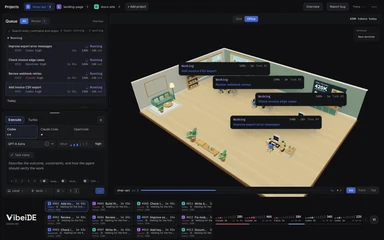 Your agents, in one office.Every task gets a desk and a live status card. Click a desk to focus it.Try VibeiDE free
Everything below was checked against the official agent teams documentation as of November 2026. The feature changes often, so treat version numbers as a snapshot.
What are Claude Code agent teams?
An agent team is a group of Claude Code instances that work on one job together, coordinated by a lead session.
The docs describe four parts:
| Part | Role |
|---|---|
| Team lead | The main Claude Code session. It spawns teammates and coordinates the work |
| Teammates | Separate Claude Code instances, each with its own context window |
| Task list | A shared list of work items that teammates claim and complete |
| Mailbox | The messaging system between agents |
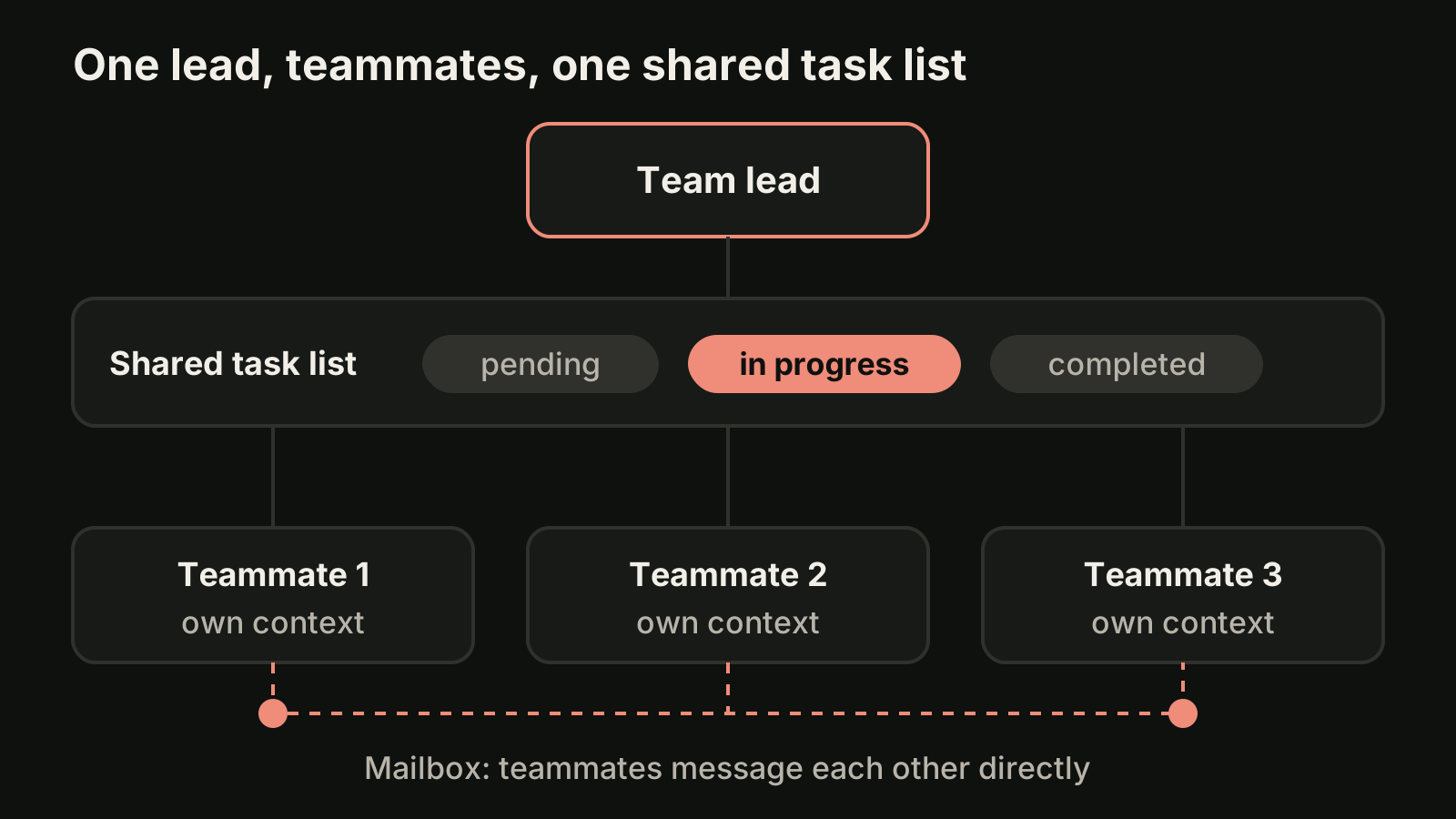
A teammate loads the same project context as a normal session (CLAUDE.md, MCP servers and skills) plus the spawn prompt from the lead. The lead's conversation history does not carry over, so anything a teammate must know belongs in that spawn prompt. You can talk to any teammate directly without going through the lead.
How do agent teams differ from subagents?
Subagents report a result back to the session that called them, while teammates share a task list and talk to each other.
That is the whole difference in one line, and it decides which one you want. A Claude Code subagent is a quick worker inside your session: it does a noisy side task in its own context and returns a summary. A teammate is a full, independent session that can challenge another teammate's findings, claim the next task on its own and be messaged by you.
| Agent teams | Subagents | Separate sessions in worktrees | Task queue across projects | |
|---|---|---|---|---|
| Who coordinates | A lead session | Your main session | You | You, through a queue per project |
| Workers talk to each other | Yes, directly | They return a result to the caller | Only through cross-session messaging | No, tasks are independent |
| File isolation | None by default: teammates share the checkout | Optional isolation: worktree | One git worktree per session | Depends on the tool, often a worktree per task |
| Scope | One session, one team | One session | One repository, many terminals | Many repositories, often several coding CLIs |
| Token cost | Highest: every teammate is a separate instance | Lower: results are summarized back | One full session each | One full session per task |
| Best for | Research, review and debugging with competing hypotheses | Focused side tasks where only the result matters | Independent features you steer yourself | A backlog of unrelated tasks that each need review |
The docs make the same call: use subagents for focused workers that report back, and agent teams when teammates need to share findings and coordinate on their own. For sequential work, edits to the same files or tasks with many dependencies, they recommend a single session or subagents instead.
How do you enable agent teams?
Set the environment variable CLAUDE_CODE_EXPERIMENTAL_AGENT_TEAMS to 1, either in your shell or in settings.json.
{
  "env": {
    "CLAUDE_CODE_EXPERIMENTAL_AGENT_TEAMS": "1"
  }
}
Two requirements are easy to miss:
- An interactive session. In non-interactive mode with
claude -p, including Agent SDK sessions, Claude does not spawn teammates. - The Task tools for a shared list. As of November 2026 the tools reference says the task tools are on by default only on Opus 4.7, Sonnet 4.6, Haiku 4.5 and earlier models. On other models, start Claude Code with
CLAUDE_CODE_ENABLE_TODO_TOOLS=1or the team coordinates through messages only. Our Claude Code tasks guide covers that list in detail.
Turning the variable on also changes ordinary delegation. While agent teams are enabled, a subagent that Claude names on its own launches as a teammate, so a team can form when you did not ask for one. To go back, set the variable to 0; the docs say the running session picks that up when you save the settings file.
How do you start and control a team?
Describe the job and the teammates you want in plain language, and the lead spawns them.
The example from the docs works because the three roles are independent:
I'm designing a CLI tool that helps developers track TODO comments across
their codebase. Spawn three teammates to explore this from different angles:
one on UX, one on technical architecture, one playing devil's advocate.
Sometimes Claude uses subagents instead. Both appear in the same agent panel, so if you wanted a team, ask again and say "agent team" explicitly.
Teammates appear in the agent panel below the prompt input. The keys that matter:
| Key | What it does |
|---|---|
| Up and Down | Select a teammate in the agent panel |
| Enter | Open the selected teammate's transcript and message it directly |
| Escape | Clear the selection, or interrupt the teammate's turn while you view it |
x | Stop the selected teammate |
| Ctrl+T | Toggle the task list |
A few prompts cover most of the control you need:
Spawn 4 teammates to refactor these modules in parallel. Use Sonnet for each teammate.
Wait for your teammates to complete their tasks before proceeding
Ask the researcher teammate to shut down
The first sets the team size and model, the second stops a lead that starts doing the work itself, and the third ends one teammate gracefully. You can also reuse a subagent definition as a role: "Spawn a teammate using the security-reviewer agent type to audit the auth module."
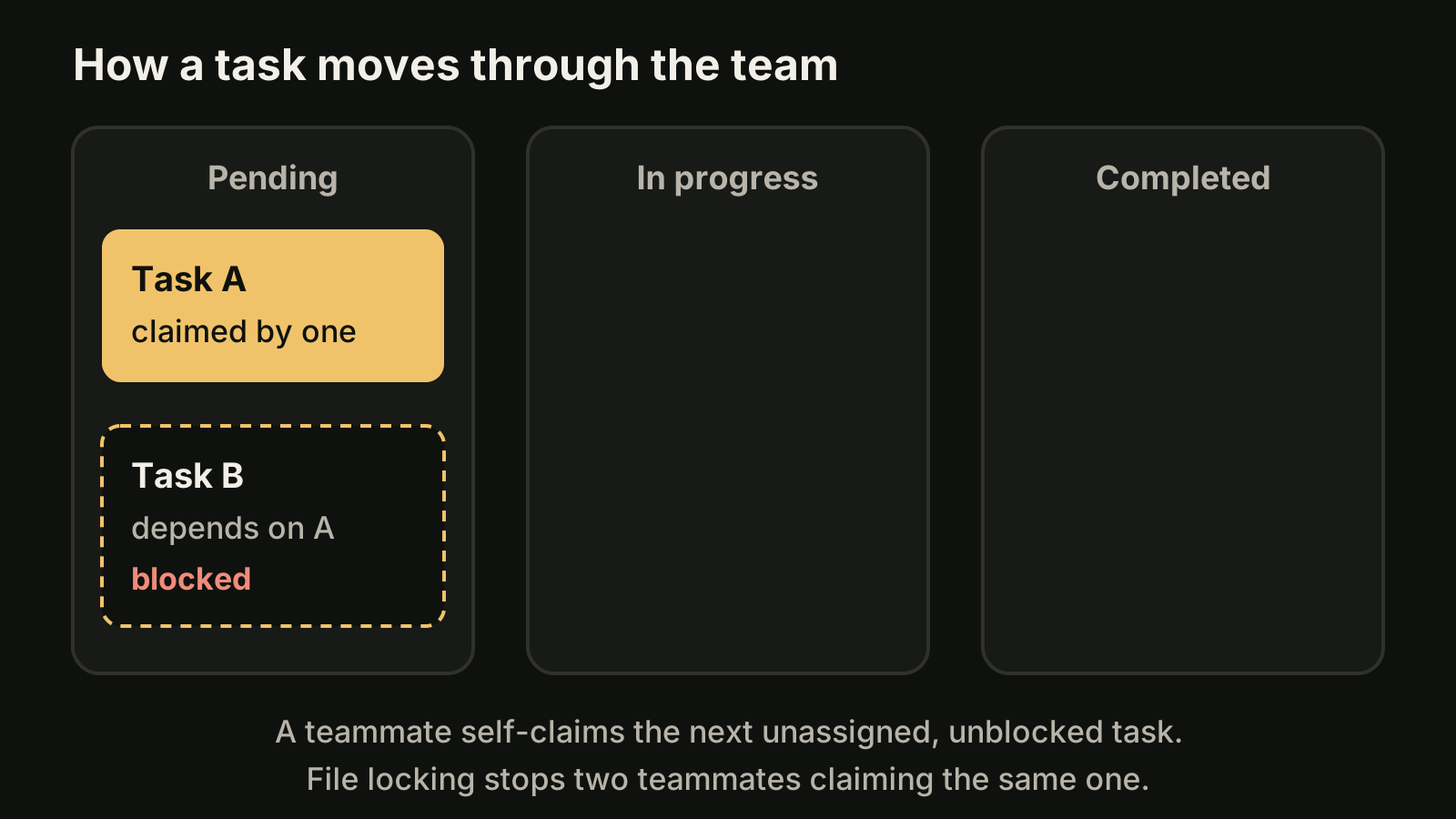
Tasks have three states: pending, in progress and completed. A task can depend on other tasks and shows as blocked until they finish. The lead can assign a task, or a teammate self-claims the next unassigned, unblocked one, and claiming uses file locking so two teammates cannot take the same task.
If you want a gate on quality, three hooks fire for teams: TeammateIdle, TaskCreated and TaskCompleted. Exiting with code 2 sends feedback and keeps the teammate working, or blocks the task from being created or completed.
Which display mode should you use?
Start with the default in-process mode, and switch to split panes only if you already live in tmux or iTerm2.
| Mode | What you see | Needs |
|---|---|---|
in-process (default) | All teammates inside your main terminal, selected from the agent panel | Nothing extra, works in any terminal |
tmux or iterm2 | One pane per teammate, all output visible at once | tmux, or iTerm2 with the it2 CLI |
auto | Split panes when you are already in tmux or iTerm2 with it2, otherwise in-process | Same as above |
Set it once with teammateMode in ~/.claude/settings.json, or per session:
claude --teammate-mode autoThe docs note that this flag is experimental and does not appear in claude --help. Split-pane mode is not supported in VS Code's integrated terminal, Windows Terminal or Ghostty.
How much do agent teams cost in tokens?
A team uses far more tokens than one session, because every teammate is a separate Claude instance with its own context window.
The costs page puts a number on it: as of November 2026, agent teams use approximately 7x more tokens than standard sessions when teammates run in plan mode. Usage scales with the number of active teammates and how long each one runs, and each active teammate keeps consuming tokens until it exits or the session ends. The official advice:
- Start with 3 to 5 teammates and about 5 to 6 tasks per teammate.
- Use Sonnet for teammates.
- Keep spawn prompts focused, because everything in them sits in the teammate's context from the start.
- Shut teammates down when their work is done.
On a subscription, all of this draws from the same plan allowance as your other sessions.
Where do agent teams stop?
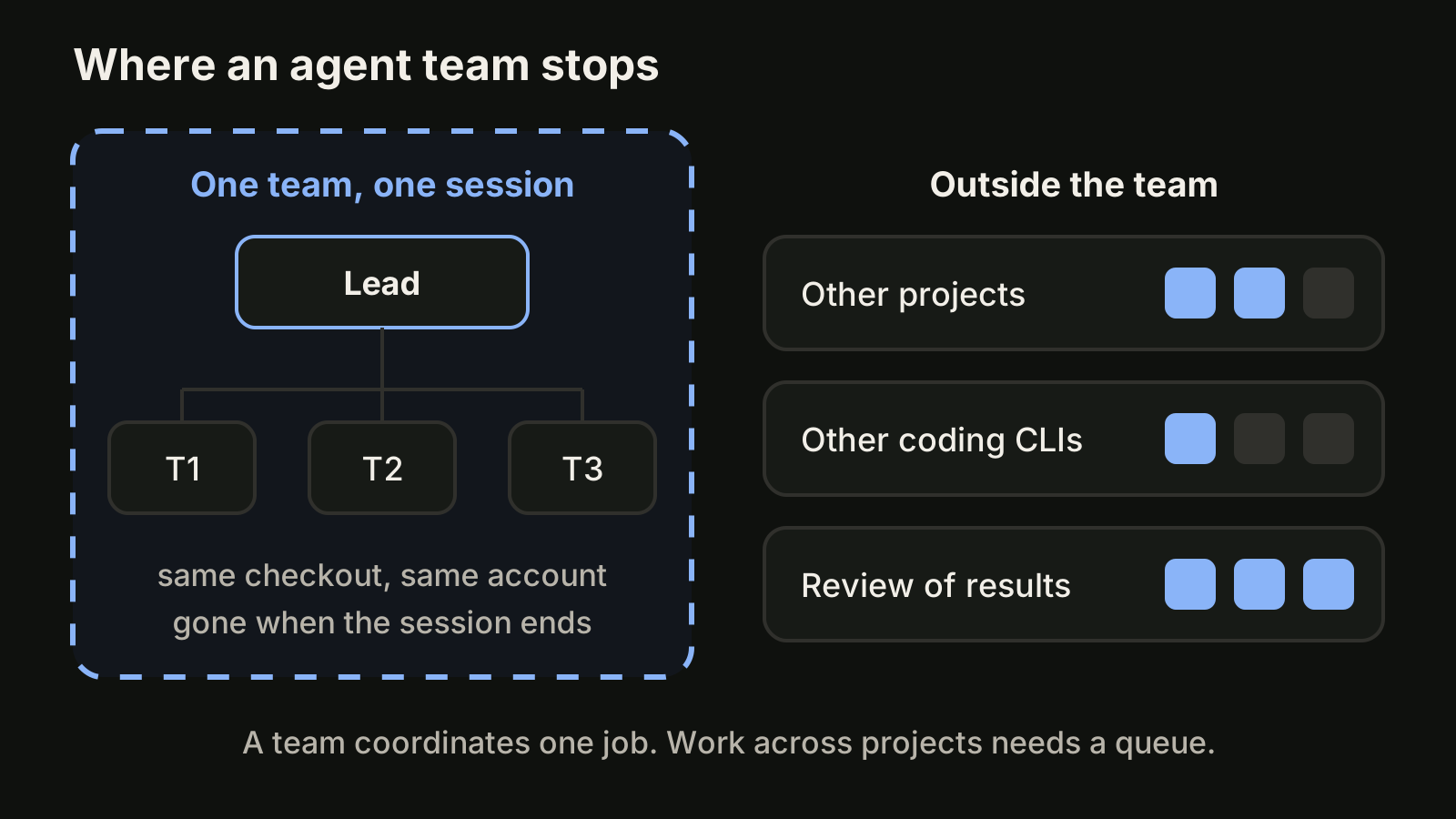
A team ends at the edge of one session: one lead, one checkout, one provider, and no memory of the team after the session closes.
The documented limitations, as of November 2026:
- One team per session. You cannot create additional named teams or share a team across sessions, and teammates cannot spawn teammates of their own.
- No session resumption for in-process teammates.
/resumeand/rewinddo not restore them, and the lead may message teammates that no longer exist. - No file isolation. The docs on running agents in parallel state that agent teams do not isolate teammates in worktrees. Two teammates editing the same file leads to overwrites, so split the work so each teammate owns different files.
- The lead is fixed. You cannot promote a teammate or transfer leadership.
- Task status can lag. A teammate sometimes fails to mark a task completed, which blocks dependent tasks until you or the lead fix it.
- Shutdown can be slow, and an orphaned tmux session may need
tmux kill-session. - Permission prompts bubble up to the lead. Teammates start with the lead's permission mode, and you approve their prompts in the lead session.
There are also things a team was never meant to do. Every worker is a Claude session, so a team does not run another vendor's coding CLI. It works in one repository, so it does not help with the three other projects waiting for you. And a finished team hands you a synthesis, not a per-task review state: the documentation describes nothing that tracks which results you have actually read.
If you need independent sessions rather than a coordinated group, the native options are separate sessions in git worktrees with claude --worktree <name>, or background sessions started with claude --bg and watched in agent view with claude agents (a research preview as of November 2026). Our Claude Code worktree guide and Claude Code queue guide cover both.
Where does VibeiDE fit?
VibeiDE is a desktop app that coordinates the Codex, Claude Code and OpenCode CLIs you already installed, with your own provider accounts, and it works at the level a team does not reach: many tasks across many projects. Each project has its own task queue with a parallel limit per provider, and a task starts when its provider has a free slot. Claude Code runs in an embedded terminal that shows the original CLI interface. Queues do not isolate files on their own, so the composer's "New worktree per task" mode gives each task its own Git worktree and branch. Finished tasks wait in Ready for review, which is an unread completion state, not a code approval. Slots do not raise a provider allowance. A 14-day trial starts at first sign-in without a card. See running AI coding agents in parallel and, for seats for a group of people, VibeiDE Teams.
FAQ
Are Claude Code agent teams available on every plan?
The agent teams page lists no plan requirement as of November 2026. It requires the environment variable and an interactive session, and usage counts against your plan or API billing like any other session.
Do agent teams work in headless mode?
No. With claude -p, including Agent SDK sessions, Claude does not spawn teammates, and a subagent that Claude names runs as an ordinary subagent.
Where are team files stored?
The team config is at ~/.claude/teams/{team-name}/config.json and is removed when the session ends. The task list is under ~/.claude/tasks/{team-name}/ and stays on disk. The team name is session- plus the first eight characters of the session ID. Do not edit the config by hand, because it is overwritten on the next state update.
Can teammates use different models?
Yes. Name the model in your spawn prompt, or set model in a subagent definition used as the teammate's role. Otherwise the teammate uses CLAUDE_CODE_SUBAGENT_MODEL when it is set, then the lead's model. A teammate's model is fixed when it spawns.
Takeaways
- Agent teams are experimental and off by default. Enable them with
CLAUDE_CODE_EXPERIMENTAL_AGENT_TEAMS=1and ask for teammates in an interactive session. - Pick a team when workers must talk to each other: research, review and debugging with competing hypotheses. Pick subagents when only the result matters.
- Start with 3 to 5 teammates, give each its own files, and shut them down when done. Token use scales with team size.
- The default in-process display mode works everywhere. Split panes need tmux or iTerm2.
- A team is one session in one checkout. For unrelated work across projects, use separate sessions in worktrees or a task queue, as in our roundup of tools to run multiple AI coding agents in parallel.