Claude Code managed settings are the settings an organization deploys to every developer, and they sit above every user, project and command line value. Admins deliver them in three ways: from the Claude admin console (server-managed settings), through an MDM or OS-level policy, or as a managed-settings.json file in a system directory. A key set there cannot be overridden from a developer's own files, apart from a few cases where a stricter lower value still counts.
 VibeiDEAll your agents. One Grid.Battery friendly, no 3D. 14 days free, no card.Download
Everything below was checked against the official Claude Code documentation as of November 2026. This is the reference for the managed tier only. For the whole rollout, from plans to shared repository files, see Claude Code for teams.
What are Claude Code managed settings?
Managed settings are ordinary Claude Code settings keys delivered by the organization instead of by the developer. They use the same JSON shape as settings.json, so anything you can write in a user file you can also enforce, plus a short list of keys that only work when a managed source sets them.
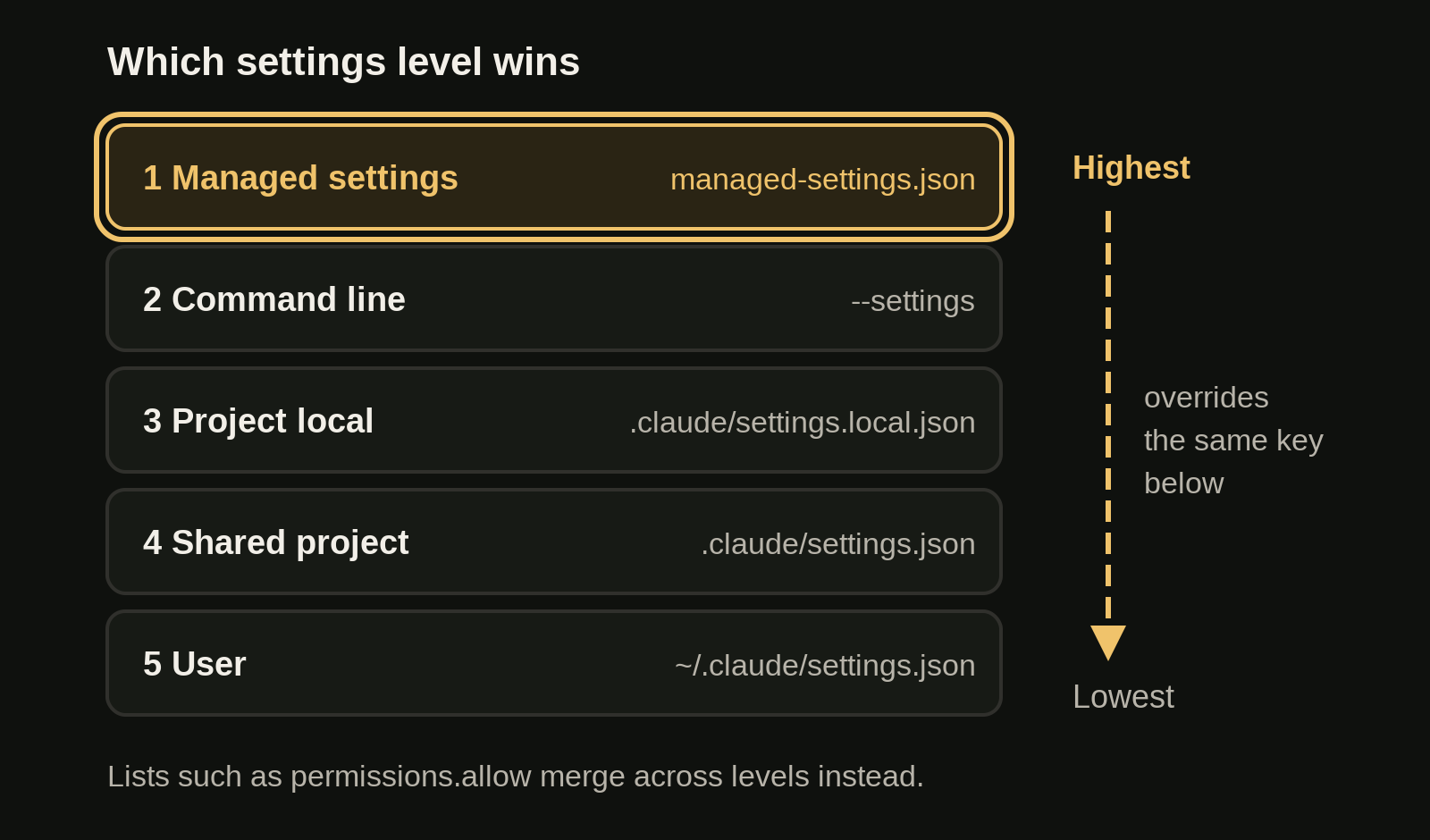
The settings documentation puts them first in the precedence order: managed settings, then the --settings flag for one session, then .claude/settings.local.json, then the shared .claude/settings.json, then ~/.claude/settings.json. Lists are the exception. A key such as permissions.allow merges across levels, so a managed list adds to a developer's list unless a lock says otherwise.
How do managed settings reach a developer's machine?
There are three main delivery mechanisms, plus a user-writable Windows registry fallback, and all of them carry the same keys.
| Mechanism | How you deliver it | When Claude Code reads it | Use it when |
|---|---|---|---|
| Server-managed settings | JSON pasted in the Claude admin console, or served by a self-hosted Claude apps gateway | Fetched at startup, polled hourly | You want one place to change policy without touching each machine |
| MDM or OS-level policy | A macOS configuration profile or a Windows HKLM registry value, through Jamf, Intune, Group Policy or similar | At startup, checked every 30 minutes | Devices are already under MDM or Group Policy |
| File-based | managed-settings.json in a system directory | At startup, reloaded when the file changes | Machines without MDM, Linux hosts, images you build |
HKCU registry (Windows, WSL) | A Windows HKCU registry value | At startup, checked every 30 minutes | You cannot write the HKLM key; used only when no admin source is present |
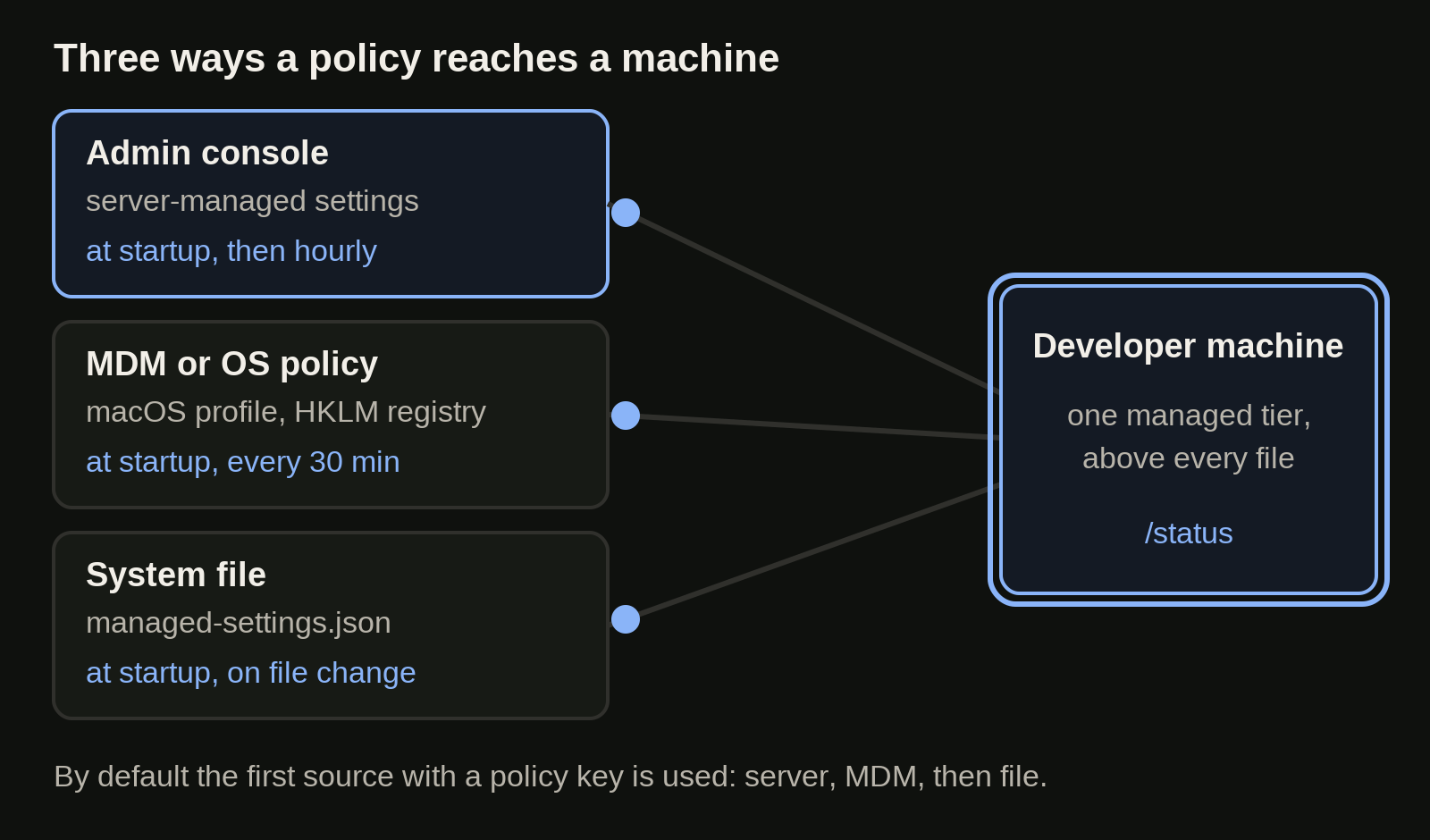
The docs call the MDM and file rows endpoint-managed settings, because the policy is stored on the device.
Server-managed settings in the admin console
Server-managed settings are available on Claude for Teams and Claude for Enterprise, as of November 2026. An Owner or Primary Owner opens Organization settings > Claude Code > Managed settings in the claude.ai console, pastes the JSON and saves. Clients need network access to api.anthropic.com and pick the policy up at the next start or the next hourly poll. Seat types and prices are in Claude Code Team plan.
The managed-settings.json file paths
The file lives in a system directory that differs per operating system:
macOS:          /Library/Application Support/ClaudeCode/managed-settings.json
Linux and WSL:  /etc/claude-code/managed-settings.json
Windows:        C:\Program Files\ClaudeCode\managed-settings.json
Claude Code does not read the legacy Windows path C:\ProgramData\ClaudeCode\managed-settings.json. If several teams own parts of the policy, put each part in a managed-settings.d/ directory next to the file. Claude Code merges managed-settings.json first, then every *.json file in alphabetical order.
MDM and OS-level policies
On macOS the policy goes in the com.anthropic.claudecode managed preferences domain, with the same top-level keys as the file. On Windows it is a REG_SZ or REG_EXPAND_SZ value named Settings under HKLM\SOFTWARE\Policies\ClaudeCode that holds the JSON.
What does a managed-settings.json file look like?
It looks like any other Claude Code settings file. This example from the managed settings documentation blocks two file reads, turns off bypass mode and makes Claude Code ignore permission rules from user, project and local files:
{
  "permissions": {
    "deny": [
      "Read(./.env)",
      "Read(./secrets/**)"
    ],
    "disableBypassPermissionsMode": "disable"
  },
  "allowManagedPermissionRulesOnly": true
}
The same JSON works in the admin console and in an MDM profile. Validate the JSON before you ship it: a managed file that cannot be parsed makes Claude Code refuse to start. The rule syntax itself is explained in Claude Code permissions.
Which source wins when several are present?
By default Claude Code uses the first managed source that delivers at least one policy key and ignores the rest. It checks them in this order:
- Remote settings from the admin console or a gateway
- MDM or OS-level policies (the macOS plist or the
HKLMregistry key) - Managed settings files (
managed-settings.d/*.jsonandmanaged-settings.jsonmerged) - The
HKCUregistry
This default is called "first-wins". To apply every admin source together, set managedSourcesBehavior to "merge" in the highest-ranked source you deploy (Claude Code v2.1.242 or later). Lists then combine and locks take the strictest value.
Two details surprise people:
- A managed
modelis a default, not a lock.--modelandANTHROPIC_MODELstill pick the model for a session. DeployavailableModelsto restrict the choice. More on model selection in Claude Code model. - A stricter lower value can still count. For a few security keys, such as
disableClaudeAiConnectorsset totrue, Claude Code honors the restrictive value from any scope even when the managed value is looser.
Which keys do admins usually lock?
Most policies cover permissions, MCP servers, hooks, models, login and plugins. The table lists the keys the docs use for each control.
| Control | Keys | What they do |
|---|---|---|
| Permission rules | permissions.deny, allowManagedPermissionRulesOnly | Deny rules for everyone, and managed settings as the only source of permission rules |
| Bypass mode | permissions.disableBypassPermissionsMode | Set to "disable" to remove the bypass permission mode |
| MCP servers | allowedMcpServers, deniedMcpServers, allowManagedMcpServersOnly | An allowlist and a denylist, and a lock that makes the managed allowlist the only one |
| Hooks | allowManagedHooksOnly | When true, restricts which hooks run |
| Models | availableModels, enforceAvailableModels | Restrict which models sessions can use |
| Login | forceLoginMethod, forceLoginOrgUUID | Pin the login method and the organization |
| Plugins | strictKnownMarketplaces, blockedMarketplaces | Control which plugin marketplaces users can add |
| Sandbox network | sandbox.network.allowManagedDomainsOnly | Honor only managed allowed domains |
| Version | requiredMinimumVersion | Refuse to start on older Claude Code versions |
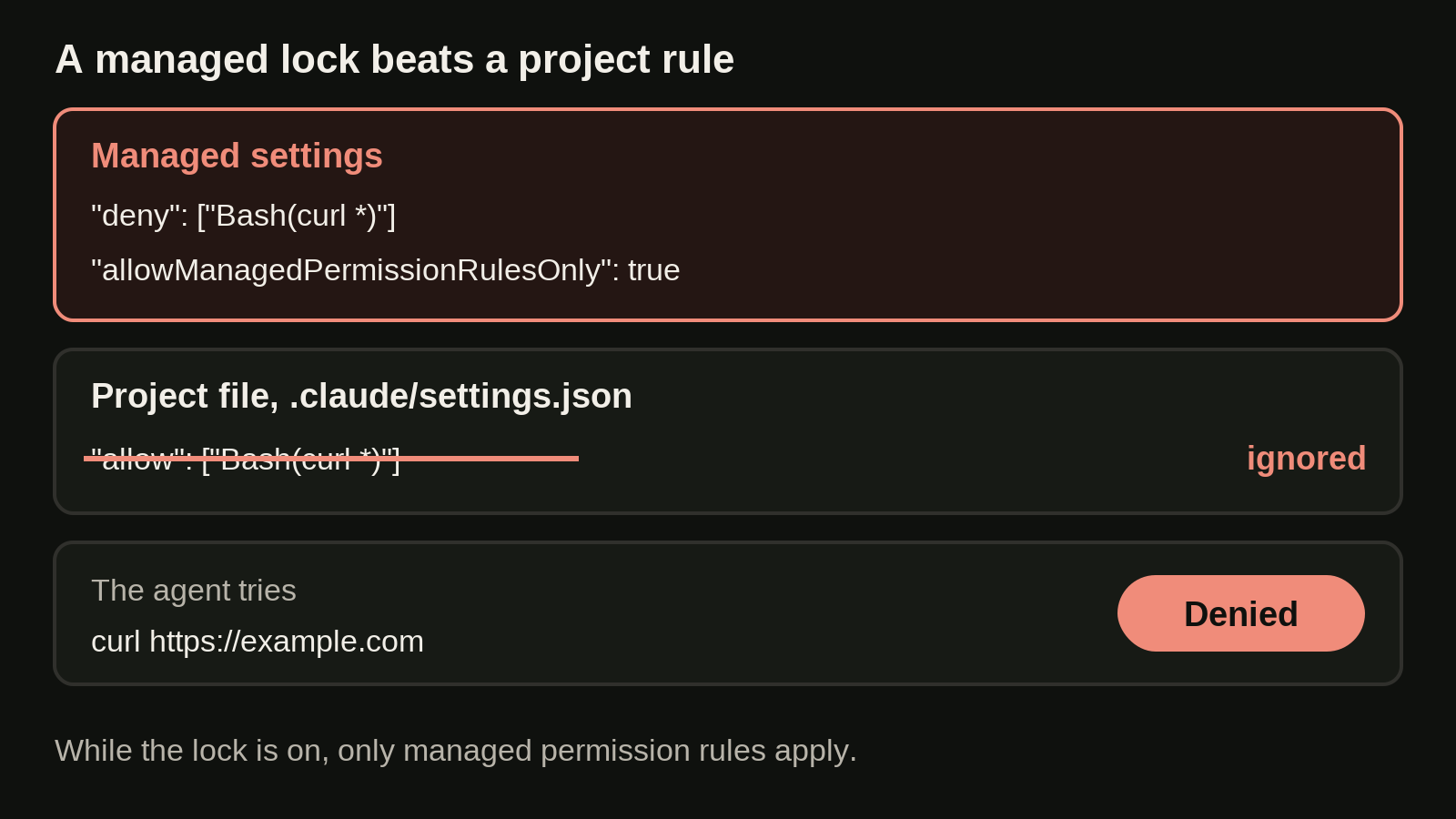
The keys with Managed in their name are locks. The value a lock governs, such as permission rules, is an ordinary key that any level can set, and the lock tells Claude Code to honor only the managed value. These keys are read only from a managed source, so placing them in a user or project file has no effect. Background on the two most common targets: Claude Code hooks and Claude Code MCP.
How do you verify what is applied?
Run /status inside Claude Code and read the Setting sources line. When a managed source is in effect it shows Enterprise managed settings with the selected source in parentheses:
| Label | Source |
|---|---|
(remote) | Server-managed settings from claude.ai or a gateway |
(plist) or (HKLM) | An MDM or OS policy |
(file), (drop-ins), (file + drop-ins) | managed-settings.json, the drop-in directory, or both |
(HKCU) | The user-writable registry fallback |
A second line, Skipped sources, names managed sources that Claude Code found and did not select (v2.1.242 or later). Two more checks help:
claude doctorlists every entry Claude Code dropped, with its source and field. From v2.1.248 itsManaged settings (remote)line reports the outcome of the server fetch./permissionsshows the effective permission rules.
What are the limits of managed settings?
Managed settings are a client-side control with a few documented gaps.
- No per-group policy in the console. Server-managed settings apply to every user in the organization. To give a group different values, deploy a different file or MDM profile to that group. A self-hosted Claude apps gateway can deliver settings per IdP group.
- Changes are not instant. Server-managed changes arrive at the next start or hourly poll. A changed
modelkey and OpenTelemetry exporter settings apply only at the next launch. - Not a security boundary. The server-managed settings page says they operate as a client-side control, and that on unmanaged devices a user does not need admin or sudo access to bypass them. Endpoint-managed settings on MDM-enrolled devices give stronger guarantees.
- Some sessions skip the server fetch. A session that uses a third-party model provider such as Amazon Bedrock or Microsoft Foundry, or a non-default
ANTHROPIC_BASE_URL, does not fetch server-managed settings. A Claude Console API key belongs to a separate organization, so a CI job that uses one does not receive the claude.ai policy. - Approval dialogs. Server-delivered hooks and shell command settings such as
statusLineshow a security dialog in interactive sessions. If the user rejects it, Claude Code exits. - No
managed-mcp.jsonfrom the console. DeliverallowedMcpServersanddeniedMcpServersinstead. - Cloud sessions. A session in an Anthropic-hosted environment does not read a device file or MDM profile, so its policy has to come from server-managed settings.
Where do managed settings stop?
Managed settings govern how Claude Code is configured, not the work it is asked to do. The docs say it directly: managed settings bind Claude Code only. They decide which commands, servers and models a session may use. They do not record who asked an agent for what, which task is in progress, or whether anyone reviewed the result before it merged.
That layer has to come from somewhere else. VibeiDE is a desktop app for macOS, Windows and Linux that coordinates the Claude Code, Codex and OpenCode CLIs you already installed. Claude Code runs in an embedded terminal that shows the original CLI interface. Each project has its own task queue, finished tasks wait in Ready for review (an unread completion state, not a code approval), and Changes shows the file diffs and can commit without leaving the app. Each user signs in to their own provider accounts, and team seats cost $14.99 per seat per month for purchases before January 1, 2027, then $19.99 for new subscriptions. The team side is described on VibeiDE Teams: shared tasks, branches and proof before merge.
How to roll out managed settings
Five steps take a policy from a draft to a verified rollout.
- Decide what to enforce. Start small: deny rules for secrets,
disableBypassPermissionsMode, an MCP allowlist. - Pick the mechanism. Use the admin console without MDM, a profile or registry policy with MDM, a file for Linux hosts and images.
- Test on one machine. Place the policy, start Claude Code and read
/status. - Run
claude doctor. Fix every entry it reports as dropped. - Roll out and tell the team. Developers whose server-managed policy contains hooks may see a security approval dialog.
FAQ
Where is managed-settings.json on macOS, Linux and Windows?
On macOS it is /Library/Application Support/ClaudeCode/managed-settings.json, on Linux and WSL /etc/claude-code/managed-settings.json, and on Windows C:\Program Files\ClaudeCode\managed-settings.json.
Can a developer override managed settings?
No. User files, project files and --settings never override a managed key. A developer who is an administrator on the machine can edit a local managed file, which is why MDM tools redeploy it on a schedule.
Do managed settings need an Enterprise plan?
Server-managed settings need Claude for Teams or Claude for Enterprise, as of November 2026. The managed settings page lists no plan requirement for the file and MDM mechanisms.
Takeaways
- Managed settings are the top level of Claude Code settings precedence.
- Deliver them from the admin console, an MDM or OS policy, or
managed-settings.jsonin a system directory. - By default one managed source applies: remote first, then MDM, then files.
- Lock permissions, MCP servers, hooks, models and login with the managed-only keys.
- Verify with
/status,claude doctorand/permissions. - They are a client-side control over configuration. Who does which task, and who reviewed it, needs a separate layer.