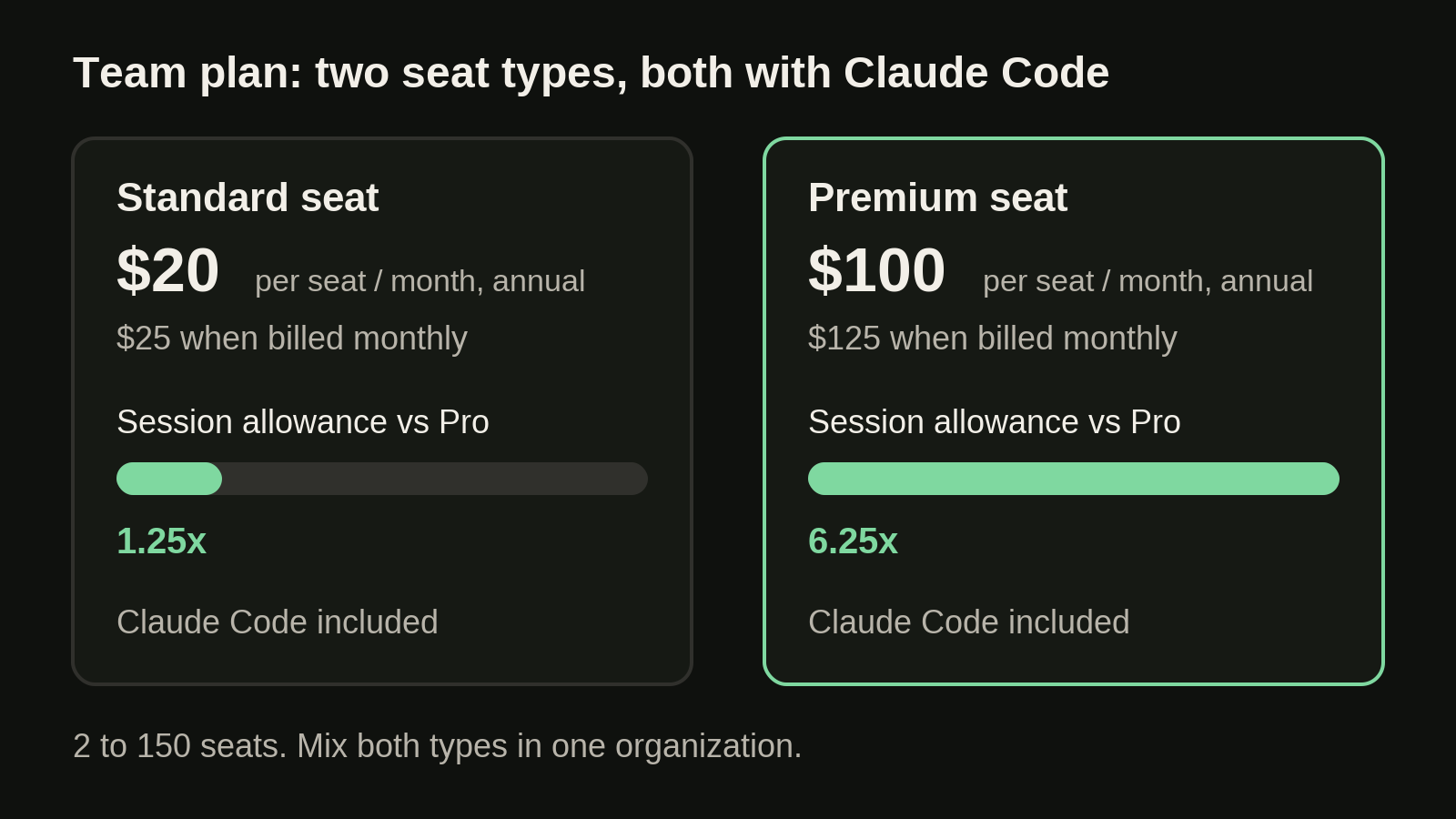
The Claude Team plan costs $20 per Standard seat per month billed annually ($25 billed monthly) or $100 per Premium seat ($125 monthly), for 2 to 150 people, as of November 2026. Claude Code is included with every seat, and the seat type only changes how much usage a person gets: a Standard seat has 1.25 times the Pro plan's session allowance, a Premium seat 6.25 times. Most teams should start everyone on Standard and move only the people who keep reaching limits to Premium.
One workspace for all your coding agents.Download VibeiDE
Every number below was read from the Claude pricing page and the Claude help center on November 24, 2026. Prices are for US customers, exclude tax and can change, so check the official page before you buy. This guide covers what you pay and how to buy. For repository settings, managed policy and rollout steps, see Claude Code for teams.
What does the Claude Code Team plan cost per seat?
A Standard seat costs $20 per month on annual billing or $25 month to month, and a Premium seat costs $100 or $125.
| Standard seat | Premium seat | |
|---|---|---|
| Billed annually | $20 per seat per month | $100 per seat per month |
| Billed monthly | $25 per seat per month | $125 per seat per month |
| Claude Code | Included | Included |
| Session allowance | 1.25x the Pro plan | 6.25x the Pro plan |
| Weekly limit | Yes, across all models | Yes, across all models |
Three billing details are easy to miss:
- Annual means paid up front. The help center's example charges 10 Standard seats as $2,400 on day one ($20 x 10 seats x 12 months). On monthly billing the same team pays $250 at the start of each cycle.
- Seat types can be mixed. One organization can hold, for example, 30 Standard and 10 Premium seats and reassign people between them.
- There is no separate Claude Code fee. The seat covers Claude Code, Claude chat and Cowork under one allowance.
Which seat includes Claude Code, and how much usage do you get?
Both seats include Claude Code, and a Premium seat carries five times the usage of a Standard seat.
The help article "What is the Team plan?" gives the per-session figures: 1.25x the Pro allowance on Standard and 6.25x on Premium. Both seat types also have a weekly limit that applies across all models and resets at a fixed time assigned to the account. Anthropic does not publish these allowances as token or message counts, so there is no honest "hours per day" number to quote.
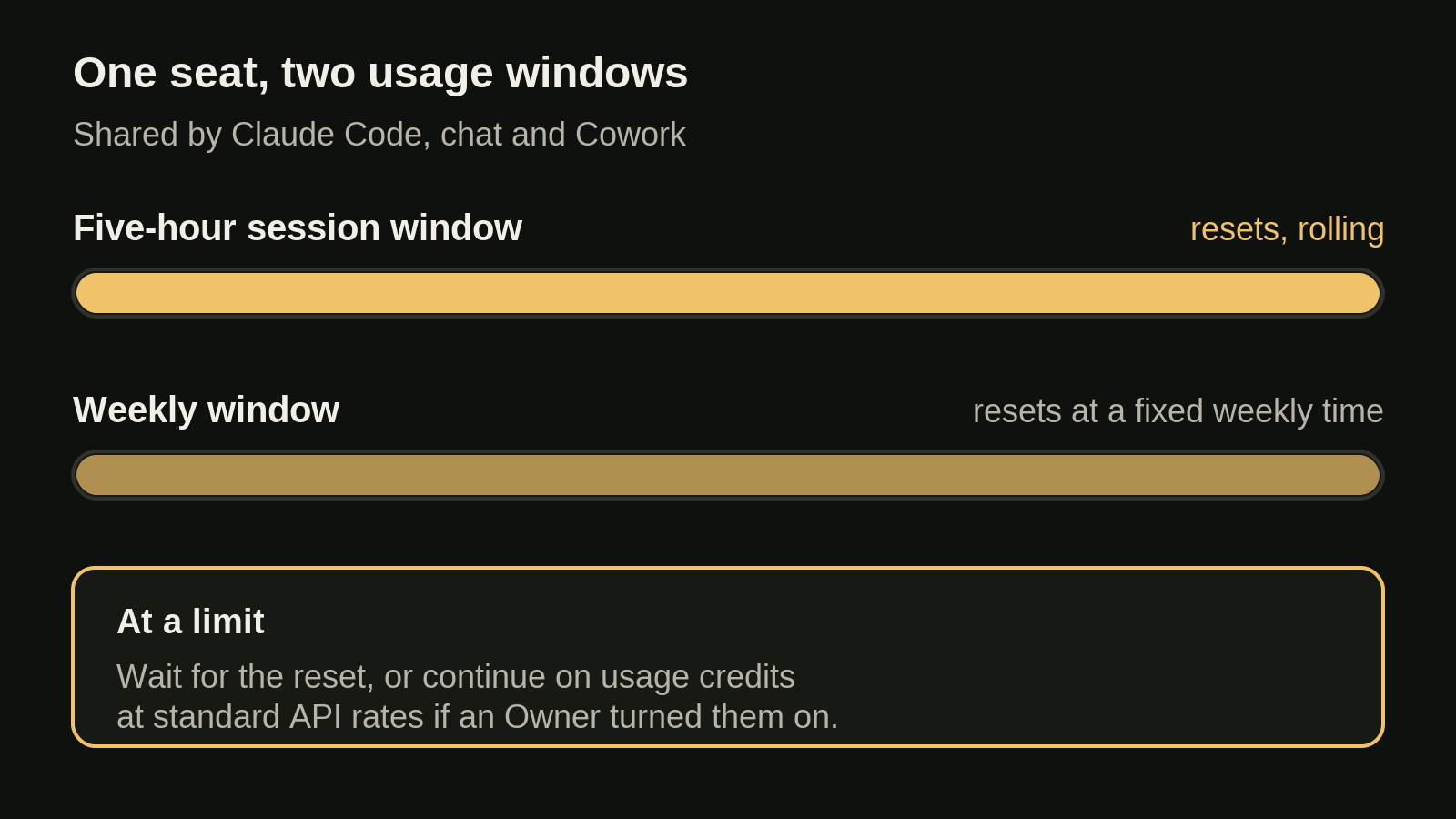
The allowance belongs to the person, not the team. It is not pooled: one developer's unused capacity does not move to a colleague who ran out. It is also shared across products, so a long Cowork or chat day leaves less for Claude Code. How the weekly window behaves in practice is covered in Claude Code weekly limit.
One model detail matters when choosing seats. As of November 2026, Fable models are part of the plan only on Premium seats, for up to 50% of the weekly limit. On Standard seats they run on usage credits from the first request.
How does a Team seat compare with Pro and Max?
A Standard seat is slightly more than Pro for about the same price, and a Premium seat is slightly more than Max for the same $100 on annual billing.
| Plan | Price per person per month | Usage, relative to Pro |
|---|---|---|
| Pro | $20, or $17 billed annually | 1x every five hours and every week |
| Max | $100 | 5x every five hours and every week |
| Ultra | $200 | 10x every week, no five-hour limit |
| Team Standard seat | $25, or $20 billed annually | 1.25x per session, weekly multiple not published |
| Team Premium seat | $125, or $100 billed annually | 6.25x per session, weekly multiple not published |
So why would three developers buy Team seats instead of three Pro or Max subscriptions? The usage is similar. What the Team plan adds is one bill, an admin console with member management, managed Claude Code settings, usage analytics and organization-wide spend limits. Individual plans leave each person with a private account that the company cannot administer. If none of that matters yet, individual plans are a reasonable start, and Ultra has no Team equivalent for one very heavy user. The token-level view of each billing path is in Claude Code cost.
What are the minimum and maximum seats?
A Team plan needs at least 2 members and supports up to 150 seats.
Above 150 seats the help center points to the Enterprise plan. There is no single-seat Team plan: a solo developer uses Pro, Max or Ultra.
What happens when a seat runs out of usage?
The person waits for the window to reset unless an Owner has turned on usage credits, which are billed at standard API rates.
Usage credits are off until an Owner or Primary Owner opens Organization settings, then Usage, and switches on "Turn on usage credits". On the Team plan the Owner buys credits in advance, can enable auto-reload, and can cap total spend for the organization. Individual monthly limits per member exist "where available": the help center says they are not offered to every Team organization.
In Claude Code, a developer who reaches a limit sees "You've hit your session limit" or "You've hit your weekly limit" with the reset time. Running /usage-credits opens the organization's usage settings for people with billing access, and sends a request to the admins for everyone else. Newer versions can also wait and continue the interrupted task after the reset.
Do not confuse usage credits with the monthly API credits that Team plans now include. Those are $20 per Standard seat and $100 per Premium seat, pooled into one balance capped at $500 a month, and they are for the Claude Platform API. The help center states they cannot be used in Claude Code or the Claude apps, including for extra usage.
When is Enterprise the next step?
Enterprise fits when you need more than 150 seats or its security and compliance features, and it is billed differently: a seat fee plus all usage at API rates.
| Team | Enterprise | |
|---|---|---|
| Seat price | $20 or $100 per month on annual billing | $20 per seat per month, billed annually |
| Usage | Included allowance per seat | Not included: every token billed at standard API rates |
| Seats | 2 to 150 | Minimum 20 self-serve, 50 through sales |
| Adds | Admin console, analytics, managed settings | Everything in Team plus audit logs, SCIM and other compliance features |
The same $20 buys different things. On Team it includes an allowance. On current Enterprise plans the help center says the seat fee "covers access only", so budget for usage separately. The Claude Code docs report an average of about $13 per developer per active day across enterprise deployments, and $150 to $250 per developer per month. What the plan adds for Claude Code, from SCIM and audit logs to spend limits and how to buy it, is covered in Claude Code Enterprise.
How do you buy and assign seats?
An Owner buys seats in Organization settings and assigns a seat type to each member from the Members page.
- Create the Team organization and pick monthly or annual billing.
- To add seats later, sign in as an Owner or Primary Owner and open Organization settings, then Organization and access.
- Click "Manage" under "Total seats", then "Add or change seats".
- Click "+" next to Standard or Premium, review the charge and choose "Confirm & purchase". New seats are prorated for the rest of the billing cycle and charged immediately.
- Open Organization settings, then Members, and use the Tier dropdown to give each person a Standard or Premium seat. Admins can do this step too.
Moving someone from Standard to Premium is a reassignment when a Premium seat is free, and a prorated purchase when it is not. Going the other way is slower: Premium to Standard changes and seat reductions take effect at the next renewal, with no prorated refund. On annual billing that can mean paying for an unused Premium seat for months, so add Premium seats one at a time. The full click path is in Purchase and manage seats on Team plans.
Each developer then runs claude, chooses "Claude account with subscription" and signs in. Someone already signed in with another account runs /login to switch.
How do you check usage on a Team seat?
Each developer runs /usage in Claude Code, and Owners read the spend report in organization analytics.
- Developer:
/usageshows plan usage bars and a breakdown of what used the allowance (skills, subagents, plugins, MCP servers). With usage credits on, it also shows the developer's own credit spend for the month. - Owner: Organization settings, then Usage, holds the credit balance and spend limits. The spend report lists estimated credit spend per user and per model, with CSV export. Usage inside the seat allowance is not metered in dollars.
- Adoption: the Claude Code analytics page shows daily active users and sessions. See Claude Code dashboard.
For what the limit messages mean, see Claude Code usage limits.
Which plan for a team of 3, 10 or 50?
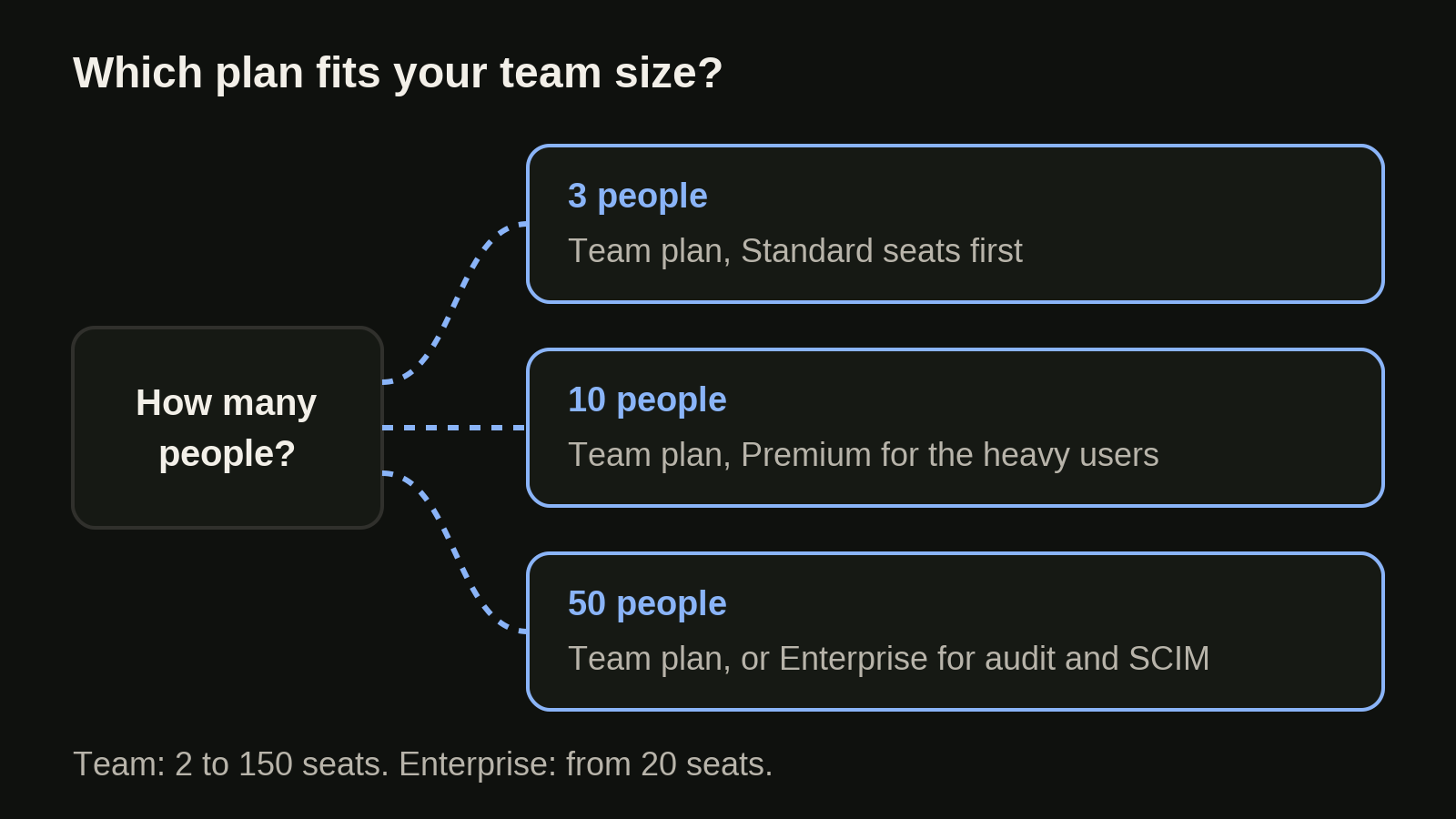
Start with Standard seats at every size and add Premium seats only for people who reach limits week after week.
| Team | A sensible start | Seat cost per month, annual billing |
|---|---|---|
| 3 developers | 3 Standard seats. Upgrade a person when limits block real work | $60 (3 x $20) |
| 10 developers | 8 Standard and 2 Premium for the heaviest users | $360 (8 x $20 + 2 x $100) |
| 50 developers | 40 Standard and 10 Premium on Team, or Enterprise if you need audit logs or SCIM | $1,800 on Team. Enterprise: $1,000 in seats plus usage at API rates |
The seat mixes are examples, not recommendations from Anthropic. Measure first: run a few weeks on Standard seats and see who actually hits the weekly limit. On monthly billing the same mixes cost $75, $450 and $2,250.
Is a VibeiDE Teams seat the same thing?
No. VibeiDE is a desktop app for macOS, Windows and Linux that coordinates the Claude Code, Codex and OpenCode CLIs you already installed, and a VibeiDE Teams seat is a separate license for that app: $14.99 per seat per month for purchases before January 1, 2027, then $19.99 for new subscriptions (pricing). Each user signs in to their own provider accounts, so the Claude seat, its usage and its costs stay separate from the VibeiDE license. The app's usage display shows provider-reported usage and reset countdowns where the provider reports them. It does not raise a provider allowance or bypass provider limits.
FAQ
Is Claude Code included in the Team plan Standard seat?
Yes. As of November 2026 the help center says Claude Code is included with every Team plan seat. Premium seats only add usage.
Can I buy one Premium seat and keep the rest Standard?
Yes. Seat types can be mixed, and an Owner or Admin can reassign people between the seats the plan owns.
Is Team plan usage shared across the team?
No. Each member has a personal session and weekly allowance. Only usage credits and the monthly API credits are organization-wide balances.
Can the monthly API credits pay for Claude Code?
No. They are for the Claude Platform API and cannot be used in interactive Claude Code or the Claude apps.
Can a Team plan have more than 150 seats?
No. Above 150 seats the next step is the Enterprise plan.
Takeaways
- Team plan seats cost $20 (Standard) or $100 (Premium) per month on annual billing, $25 or $125 monthly, for 2 to 150 seats, as of November 2026.
- Every seat includes Claude Code. Standard has 1.25x the Pro session allowance, Premium 6.25x, and both have a weekly limit.
- Allowances are personal and shared with chat and Cowork. Past a limit, work continues on usage credits at API rates only if an Owner enabled them.
- Upgrades to Premium apply at once and are prorated. Downgrades and seat reductions wait for renewal.
- Enterprise starts at 20 seats and bills all usage at API rates on top of the seat fee.