MCP (Model Context Protocol) is how Claude Code talks to tools outside your repository: an issue tracker, a database, a browser, your company docs. You add a server once, Claude Code loads its tools, and Claude can call them in any session where that server is in scope. This guide covers the commands, the three transports, scopes, .mcp.json, authentication and the limits that trip people up, all checked against the official MCP documentation as of October 2026.
Add an MCP server with claude mcp add
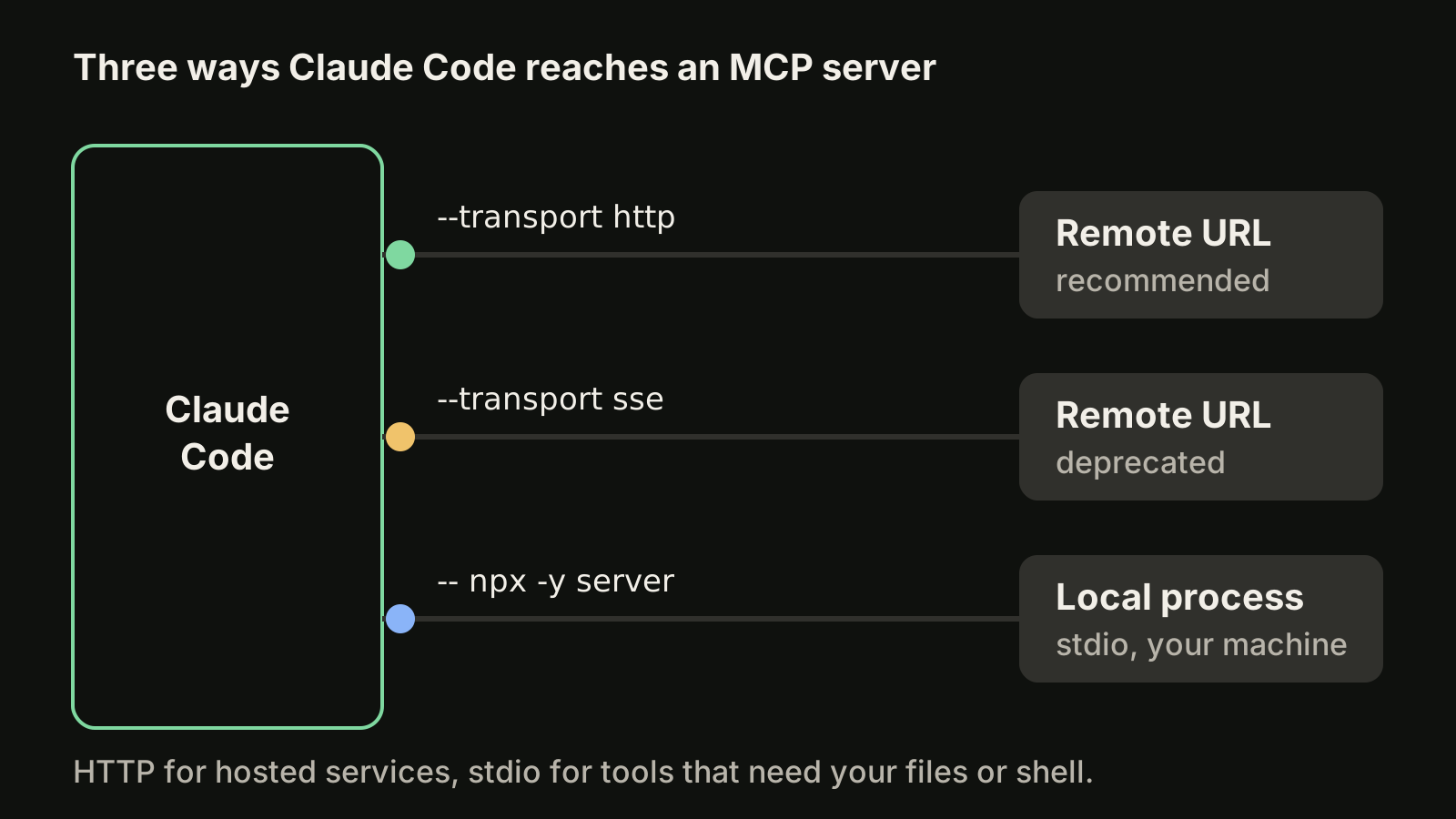
Every server is added with claude mcp add. The transport decides what goes after the name.
For a remote server, use HTTP. It is the recommended transport for hosted services:
claude mcp add --transport http notion https://mcp.notion.com/mcpIf the server needs a token in a header, pass it with --header (short form -H):
claude mcp add --transport http secure-api https://api.example.com/mcp \
  --header "Authorization: Bearer your-token"
For a tool that runs on your machine, use stdio. Claude Code starts the process and talks to it over standard input and output:
claude mcp add --env AIRTABLE_API_KEY=YOUR_KEY --transport stdio airtable \
  -- npx -y airtable-mcp-server
Two details matter in that command:
- The
--separator. Everything after--is passed to the server untouched. Without it, Claude Code would try to parse the server's own flags, such as--port, as its options. - Where
--envgoes.--env(short form-e) accepts severalKEY=valuepairs, so put at least one other option between--envand the server name. In the example,--transport stdiodoes that job.
SSE still works with --transport sse, but the docs mark it as deprecated: use HTTP where the server offers it. On v2.1.265 or later, --transport http tries HTTP first and switches to SSE automatically.
If you already have the JSON for a server, skip the flags:
claude mcp add-json weather-api '{"type":"http","url":"https://api.weather.com/mcp","headers":{"Authorization":"Bearer token"}}'add-json is also the way to add a WebSocket server, because --transport does not accept ws. On macOS and WSL, claude mcp add-from-claude-desktop imports the servers you set up in Claude Desktop.
Choose a scope: local, project or user
The --scope flag (short form -s) decides where the server is stored and who gets it.
| Scope | Loads in | Shared with the team | Stored in |
|---|---|---|---|
local (default) | Current project only | No | ~/.claude.json |
project | Current project only | Yes, via version control | .mcp.json in the project root |
user | All your projects | No | ~/.claude.json |
A practical split:
- Personal credentials or experiments:
local. Nothing lands in the repository. - Servers the whole team needs for this repo:
project. Commit.mcp.jsonso everyone gets the same setup. - Tools you want everywhere, such as a docs or search server:
user.
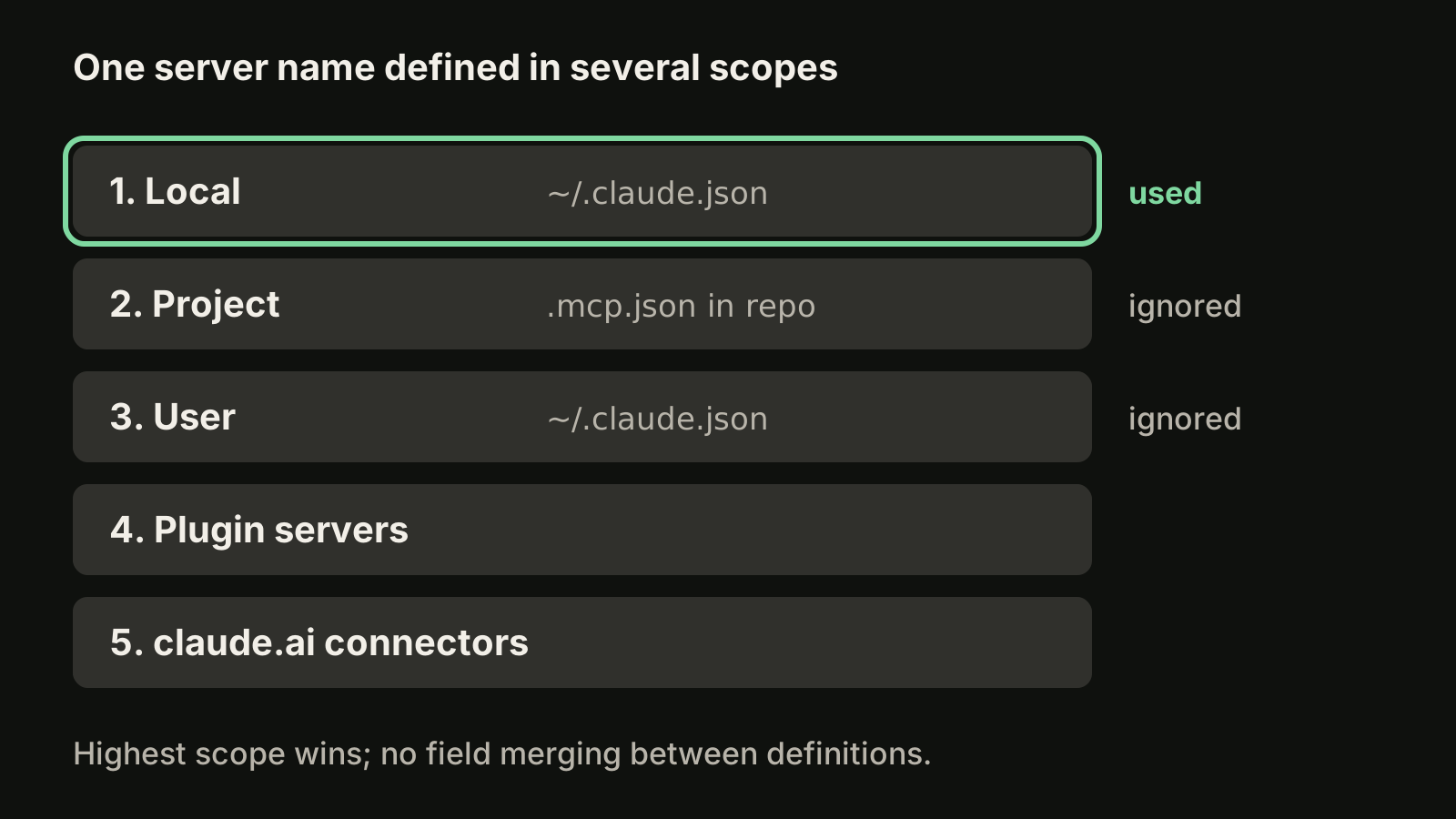
When the same server name exists in several scopes, Claude Code uses one definition and does not merge fields. The order is local, then project, then user, then servers provided by plugins, then claude.ai connectors. Servers an organization pushes through the managedMcpServers setting rank above all of these.
Share servers with .mcp.json
Project-scoped servers live in .mcp.json. Keep secrets out of the file with environment variable expansion:
{
  "mcpServers": {
    "api-server": {
      "type": "http",
      "url": "${API_BASE_URL:-https://api.example.com}/mcp",
      "headers": {
        "Authorization": "Bearer ${API_KEY}"
      }
    }
  }
}
${VAR} expands to the variable's value and ${VAR:-default} falls back to the default when the variable is unset. Expansion works in command, args, env, url and headers. If a variable is unset and has no default, the text stays unexpanded and claude mcp list warns you about it.
For safety, Claude Code asks for approval in interactive sessions before it uses project servers from an .mcp.json it has not seen. If you answered wrong, reset the choices with claude mcp reset-project-choices. Note the exception: in claude -p runs (see our headless mode guide), Agent SDK and cloud sessions there is no prompt, and the servers load without asking. To block one there, list it in disabledMcpjsonServers.
Manage servers: list, get, remove and /mcp
From the shell:
claude mcp list            # every configured server and its status
claude mcp get notion      # details for one server
claude mcp remove notion   # delete it
Inside a session, /mcp opens the MCP panel. It shows each connected server with its tool count, flags servers that expose no tools, and is where you authenticate remote servers. Removing a remote server also deletes its stored OAuth tokens.
Authenticate remote servers with OAuth
Many hosted servers use OAuth. Add the server, run /mcp in Claude Code and follow the browser flow, or sign in from the shell:
claude mcp login sentry
claude mcp logout sentry
Some servers need pre-registered client credentials. Pass them when you add the server:
claude mcp add --transport http \
  --client-id your-client-id --client-secret --callback-port 8080 \
  my-server https://mcp.example.com/mcp
--client-secret prompts for the secret with masked input (or reads MCP_CLIENT_SECRET), and --callback-port fixes the redirect to http://localhost:8080/callback.
Timeouts and output limits
Two kinds of limits cause most "the tool just stopped" reports.
Timeouts. MCP_TIMEOUT sets how long Claude Code waits for a server to start, in milliseconds:
MCP_TIMEOUT=10000 claudeMCP_TOOL_TIMEOUT covers tool execution, and a per-server "timeout" field in .mcp.json overrides it for that one server.
Output size. As of October 2026, Claude Code shows a warning when an MCP tool returns more than 10,000 tokens and limits output to 25,000 tokens by default. A result over the limit is saved to a file and Claude gets the path instead of the content. To raise the cap, set the variable before you start Claude Code:
export MAX_MCP_OUTPUT_TOKENS=50000
claude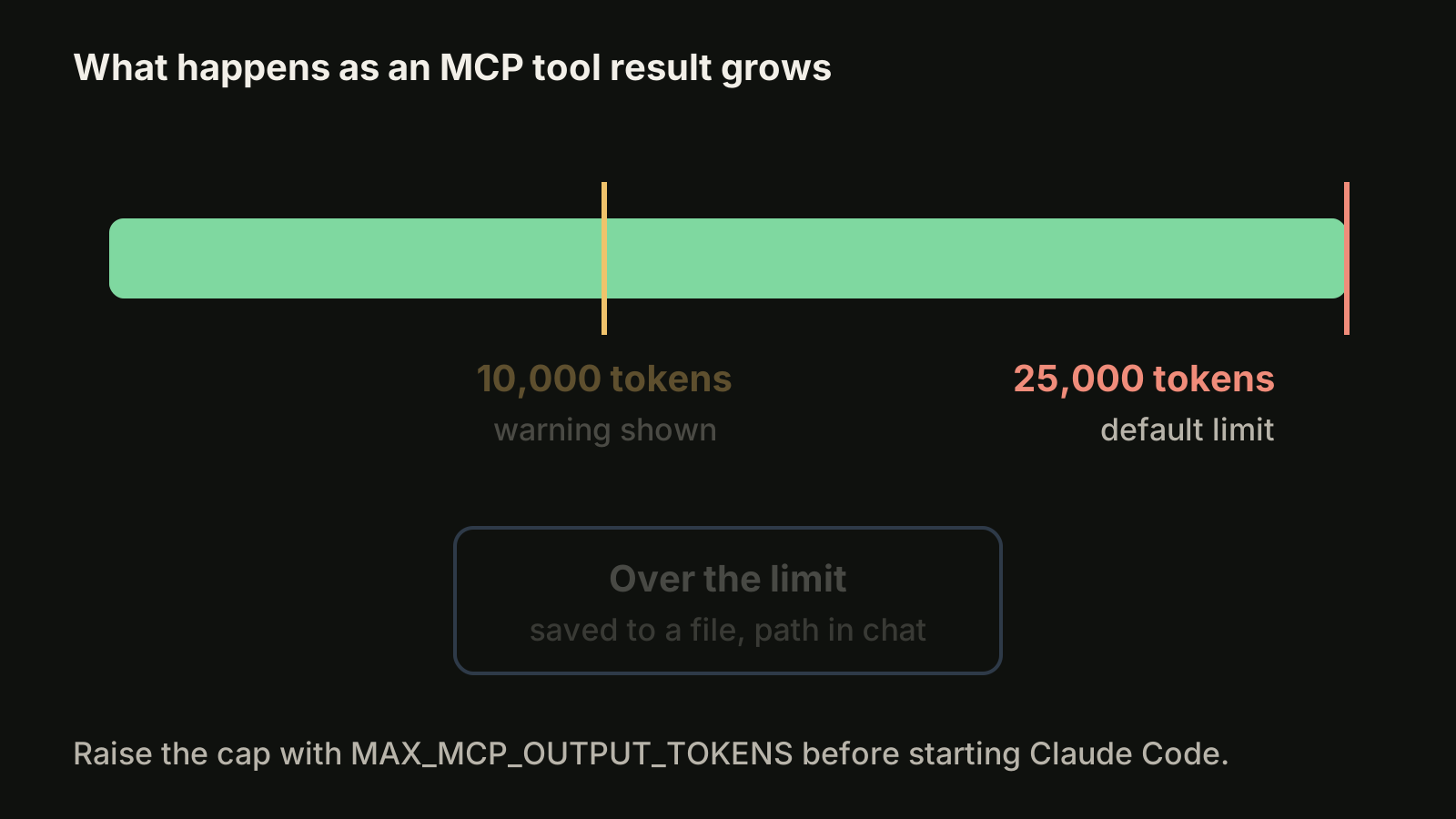
Raise it only for servers that need it. Every token a tool returns sits in the context window for the rest of the session.
How many MCP servers is too many?
Fewer than you might fear. Tool search is on by default: only tool names and server instructions load when a session starts, and full tool definitions are fetched when Claude needs them. Claude Code sets no fixed per-server tool cap, so the practical limit is your context budget.
What still costs context is what the tools return. A database server that dumps a full schema, or a browser server that returns whole pages, fills a session quickly. Keep heavy servers in local or project scope for the repos that need them rather than in user scope for everything.
MCP tools also follow your permission rules, so allow the read-only tools you trust and keep prompts on anything that writes.
Use MCP resources with @ mentions
Some servers expose resources as well as tools. Type @ in the prompt and they appear next to files in the autocomplete. The format is @server:protocol://resource/path:
Can you analyze @github:issue://123 and suggest a fix?Referenced resources are fetched and attached to the prompt, and you can mention several in one message.
Run Claude Code as an MCP server
It works the other way too. claude mcp serve exposes Claude Code's own tools over stdio to another MCP client. It prints nothing when it starts. For Claude Desktop, add it to claude_desktop_config.json:
{
  "mcpServers": {
    "claude-code": {
      "type": "stdio",
      "command": "claude",
      "args": ["mcp", "serve"],
      "env": {}
    }
  }
}
If claude is not on the client's PATH, use the full path from which claude, otherwise you will see spawn claude ENOENT.
Where VibeiDE fits
MCP setup pays off most when you run several Claude Code sessions across projects. VibeiDE runs Codex and Claude Code in embedded terminals that show the original CLI interface, gives each project its own task queue, and keeps finished tasks in Ready for review until you look at them. Each user signs in to their own provider accounts, and provider subscriptions, usage and costs are separate from the VibeiDE license. For more Claude Code setup, see the Claude Code commands reference and the skills guide.
Takeaways
- Add remote servers with
claude mcp add --transport http <name> <url>and local tools with stdio after a--separator. - Pick the scope on purpose:
localfor personal setups,projectwith a committed.mcp.jsonfor the team,userfor tools you want everywhere. - Local beats project beats user; definitions are never merged.
- Keep secrets out of
.mcp.jsonwith${VAR}and${VAR:-default}. - Use
/mcporclaude mcp loginfor OAuth, andclaude mcp listwhen something does not load. - Output over 25,000 tokens is saved to a file by default; raise
MAX_MCP_OUTPUT_TOKENSonly where you need it.