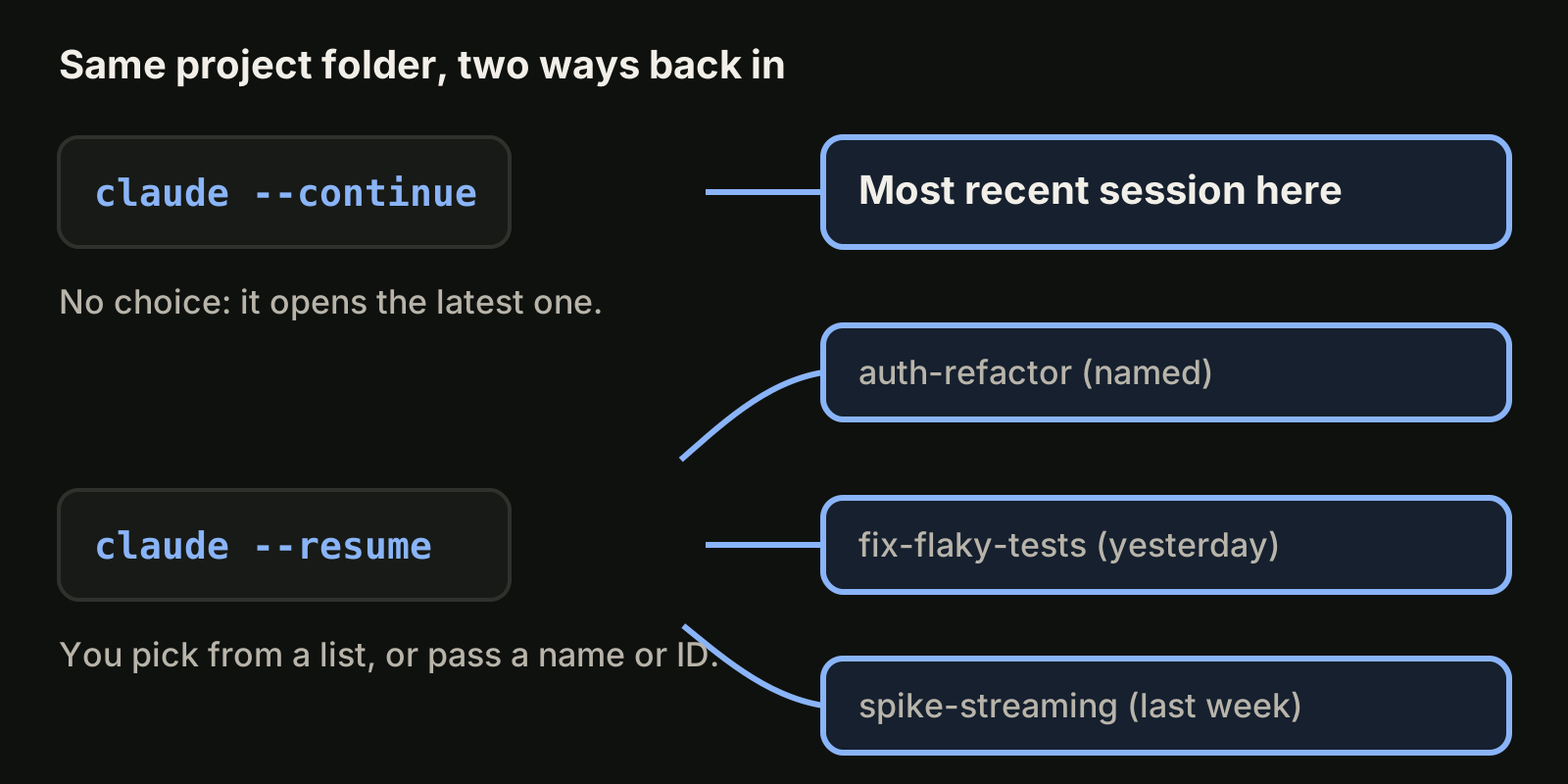
The short answer: claude --continue (or -c) reopens the most recent conversation in the folder you are in, with no questions asked. claude --resume (or -r) lets you choose: it opens a picker, or jumps straight to a session you name by ID or name. Use continue when you just closed the terminal and want to keep going; use resume when you run several sessions and need a specific one. Both load the same saved transcript, so the conversation itself comes back the same way.
 Your agents, in one office.Every task gets a desk and a live status card. Click a desk to focus it.Try VibeiDE free
This guide covers what each command does as of November 2026, how the picker works, what a resumed session restores, and the cases where continue picks the wrong session. Everything below is checked against the official Claude Code sessions documentation and the CLI reference.
What is the difference between claude --continue and --resume?
--continue is a shortcut with one fixed target, while --resume is a selector. The table sums it up.
claude --continue / -c | claude --resume / -r | |
|---|---|---|
| What it opens | The most recent session in the current directory | A session you pick, name or pass by ID |
| Asks you anything | No | Opens the picker when you pass no argument |
| Works from another folder | No, it only looks at the current directory | Yes, by session ID (searches every project on the machine) |
| Accepts a name | No | Yes: claude --resume auth-refactor |
| Accepts a transcript path | No | Yes: the absolute path to a .jsonl transcript |
Includes claude -p sessions | No (only with claude -p --continue) | Yes, when you pass the session ID |
| Fork into a copy | claude --continue --fork-session | claude --resume <id> --fork-session |
Inside a running session, /resume does the same job as claude --resume: it opens the picker, or switches directly with /resume <name>.
How do I continue my last Claude Code session?
Open a terminal in the same project folder and run:
claude --continueClaude Code reopens the latest conversation stored for that directory. If there is none yet, it prints No conversation found to continue and exits. You can also add a prompt for scripts:
claude -c -p "Check for type errors"Three details decide which session counts as "the most recent one":
- The folder matters. Sessions are stored per project directory, so running
claude -cone level up or in another worktree finds a different session, or none. - Some sessions are skipped. Sessions started with
claude -p, the Agent SDK, or whose first prompt was/loopare left out ofclaude --continue.claude -p --continueincludes them. - Running background sessions are skipped. A finished background session can be continued (Claude Code v2.1.257 or later). If your latest conversation is still running in the background, Claude Code exits with
Your most recent conversation is running in the backgroundand its ID.
How do I resume a specific Claude Code session?
Run claude --resume with no argument to open the session picker:
claude --resumeOr go straight to a session:
claude --resume auth-refactor          # by name
claude --resume 550e8400-e29b-41d4-a716-446655440000   # by ID
claude -r "auth-refactor" "Finish this PR"   # resume and send a prompt
A name resolves across the current repository and its worktrees. When the name matches more than one session, claude --resume <name> opens the picker with the name as a search term, while /resume <name> reports an error. A session ID works from any directory: Claude Code searches the current project and its worktrees first, then every other project on the machine, and reports No conversation found with session ID when nothing matches.
You can also reopen the session that created a pull request with claude --from-pr 123, which opens the picker filtered to sessions linked to that PR.
How does the session picker work?
The picker lists sessions for the current worktree by default, including background sessions marked bg. Each row shows the name or generated title, time since last activity, git branch and file size.
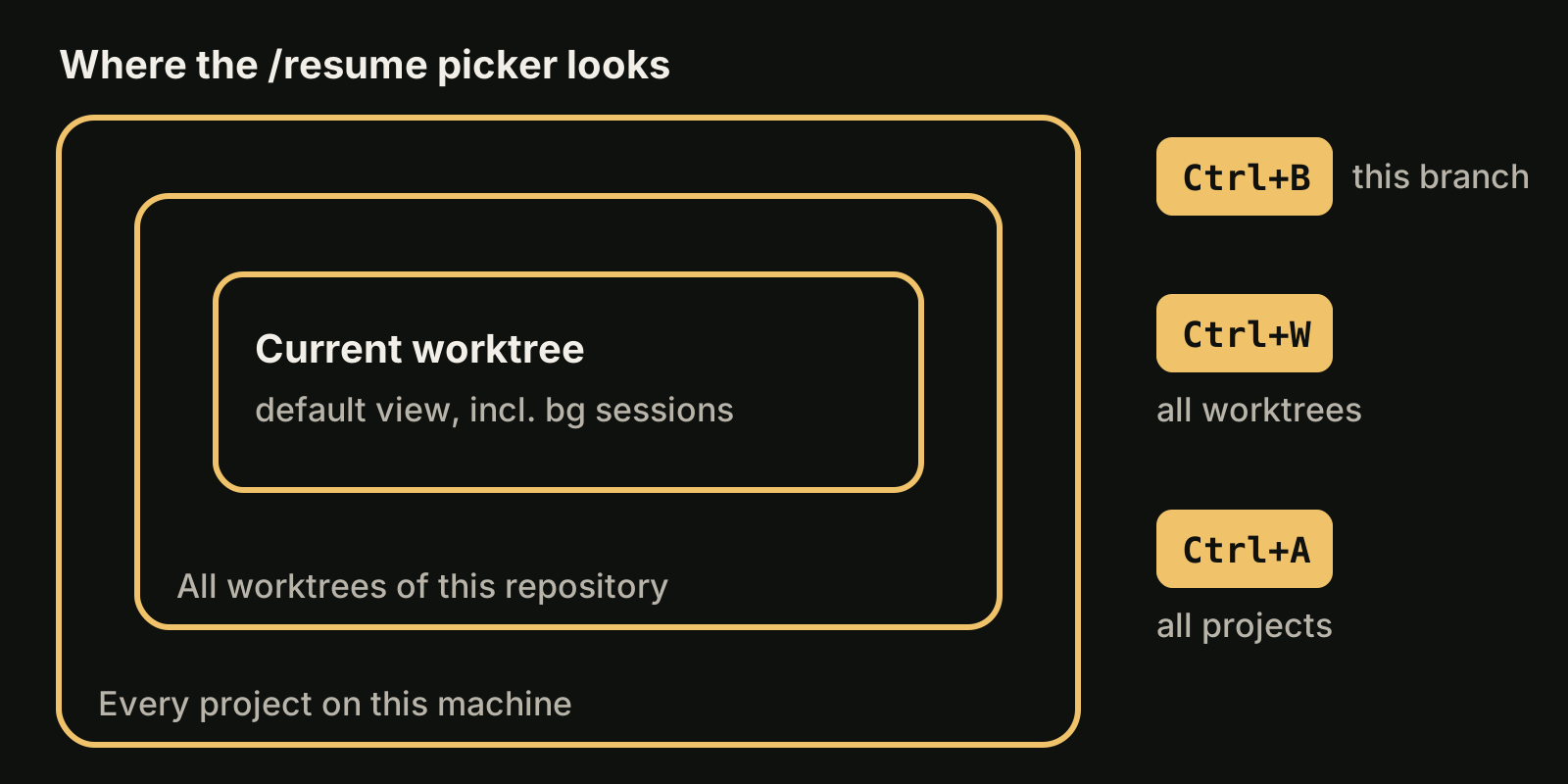
The shortcuts you will use most:
| Shortcut | Action |
|---|---|
Enter or 1 to 9 | Resume the highlighted session, or the one at that position |
Space | Preview the session content |
Ctrl+R | Rename the highlighted session |
/ or start typing | Search; paste a pull request URL to find the session that created it |
Ctrl+W | Show sessions from all worktrees of this repository |
Ctrl+A | Show sessions from every project on this machine |
Ctrl+B | Filter to sessions from the current git branch |
Esc | Leave search or the picker |
When you pick a session from an unrelated project, Claude Code copies a cd and resume command to your clipboard instead of switching folders.
Should I name my sessions?
Yes, if you keep more than two sessions alive at once. A name turns --resume into a one-step command and makes the picker readable. Set it at start with claude -n auth-refactor, mid-session with /rename auth-refactor, or from the picker with Ctrl+R.
Unnamed interactive sessions get a generated title from your first prompt, and you can pass that title to --resume too. The default display name such as my-app-3f, shown in agent view, is not a resume handle.
What does a resumed session restore?
Continue and resume load the same transcript, so they restore the same state:
- Conversation history, including tool calls and results. A compacted session opens at the
Conversation compactedrow and continues from the summary. - Model and agent. The session stays on its model and, if started with
--agent, on that agent. - Permission mode, when you resume from a terminal with
--continue, a session ID, or a unique name (without-p). A session that ended inbypassPermissionsstarts in the mode a new session would use. - Unexpired session-scoped scheduled tasks.
Not everything comes back. Pass --mcp-config, --settings, --plugin-dir, --fallback-model and --add-dir again if the session depended on them. Settings in settings.json are re-read at launch, so those need nothing. A tool call that was interrupted by a crash is not rerun; Claude is told to check whether it took effect first.
On Pro and Max plans, resuming a long conversation after a long break can show a "Resume this conversation?" dialog with an estimate of how much of your 5-hour limit the saved conversation would use, as of November 2026. If the next task does not need the old context, starting fresh is cheaper. For more on context size, see Claude Code context window.
When should I fork instead of resume?
Fork when you want to try a different approach without changing the original conversation. --fork-session creates a new session ID from the same history:
claude --continue --fork-session
claude --resume auth-refactor --fork-session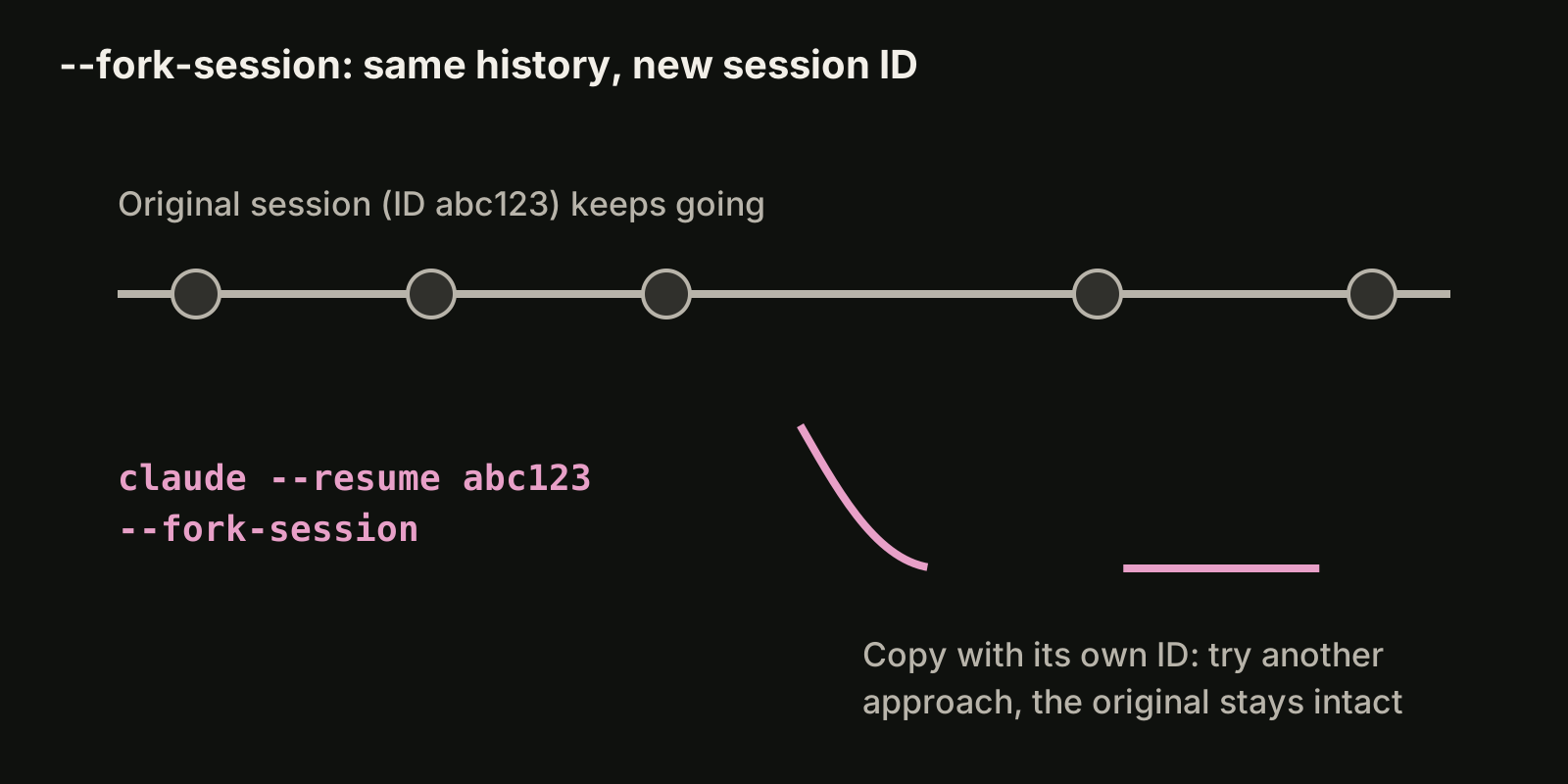
Inside a session, /branch try-streaming does the same and keeps your "allow for this session" permission grants, because it stays in the same process. A --fork-session launch is a new process, so you approve those again.
Forking also avoids a real trap: if you resume the same session in two terminals without forking, messages from both interleave into one transcript.
Where are Claude Code sessions stored?
Transcripts are JSONL files at ~/.claude/projects/<project>/<session-id>.jsonl, where <project> is the working directory path with non-alphanumeric characters replaced by -. They are kept for 30 days by default; change that with cleanupPeriodDays in settings.json. claude -p --no-session-persistence skips saving for one run.
The file format is internal and changes between versions, so use /export or claude -p --resume <session-id> --output-format json instead of parsing the files in scripts.
Which one should you use?
- Closed the terminal a minute ago:
claude -c. - Several sessions in one repo: name them, then
claude -r <name>. - Session from another project or worktree:
claude -r <session-id>, or the picker withCtrl+WorCtrl+A. - Script or CI step that follows up:
claude -p --resume <session-id>. - Experiment without risk: add
--fork-session.
If you run sessions in parallel worktrees, read Claude Code worktree for --worktree, and Claude Code headless mode for -p runs. For the Codex CLI equivalent, see Codex resume.
Keeping track of many sessions
Resume works well until you have a dozen sessions across several projects and cannot remember which one held which request. In VibeiDE, each task keeps its saved provider conversation, so a follow-up can continue that conversation instead of re-explaining the context, and each project has its own task queue where waiting prompts can be edited or reordered. See resume a Claude Code session from its saved task for how that looks in the app.
Takeaways
claude --continueopens the latest session in the current folder;claude --resumeopens the one you choose.- Name sessions with
-nor/renamesoclaude -r <name>works in one step. - Session IDs resume from any directory; names resolve within the repository and its worktrees.
--continueskipsclaude -p, SDK and/loopsessions, and running background sessions.- Resuming restores history, model and usually permission mode, but not
--mcp-config,--settingsor--add-dir. - Use
--fork-sessionor/branchto experiment, and never resume one session in two terminals.