Most complaints about Claude Code getting worse in a long session have the same root cause. Early in the session, Claude follows every instruction. Two hours and forty file reads later, it forgets a request you made at the start, repeats a fix it already tried, or quietly skips part of a task. Nothing is broken. The context window filled up, and Claude Code did what it is designed to do: it compacted the conversation into a summary.
This guide explains what the Claude Code context window holds, what fills it, what survives compaction, and the handful of commands that keep it working for you. Details are based on the official context window documentation and model configuration page as of October 2026.
What the context window is
The context window is everything Claude can see when it writes its next response: instructions, your messages, every file it read, every command output, and its own earlier replies. It is measured in tokens, and it has a fixed size per model. When the conversation approaches that size, something has to give.
The important part is that the window is shared by everything in the session. A 3,000-line log you asked Claude to read competes for space with the rule you wrote in CLAUDE.md and the request you made an hour ago.
What loads before you type anything
A surprising amount is in context before your first prompt. According to the documentation, a new session starts with:
| Loaded at startup | What it is |
|---|---|
| System prompt | Claude Code's own instructions, never shown to you |
| Auto memory | The first 200 lines or 25KB of MEMORY.md, whichever comes first |
| Environment info | Working directory, platform, shell, git status |
| MCP tools | Tool names; full schemas load on demand by default |
| Skill descriptions | One line per skill, so Claude knows what it can invoke |
| CLAUDE.md files | Your user-level and project instructions |
Each of these is small on its own, but together they set your floor. A bloated CLAUDE.md or a long list of skills is paid for in every session. That is one more reason to keep CLAUDE.md short and specific and to move long procedures into skills, whose full content loads only when they are used.
What fills it during a session
After startup, the window grows with the work itself:
- File reads. Usually the largest share. The docs put it plainly: file reads dominate context usage.
- Path-scoped rules and nested CLAUDE.md files. They load when Claude reads a file they apply to.
- Command output. Test runs, build logs and
grepresults all land in context. - Hook output. Context that hooks add goes into the conversation too.
- Your follow-ups and Claude's replies. Every turn adds to the same window.
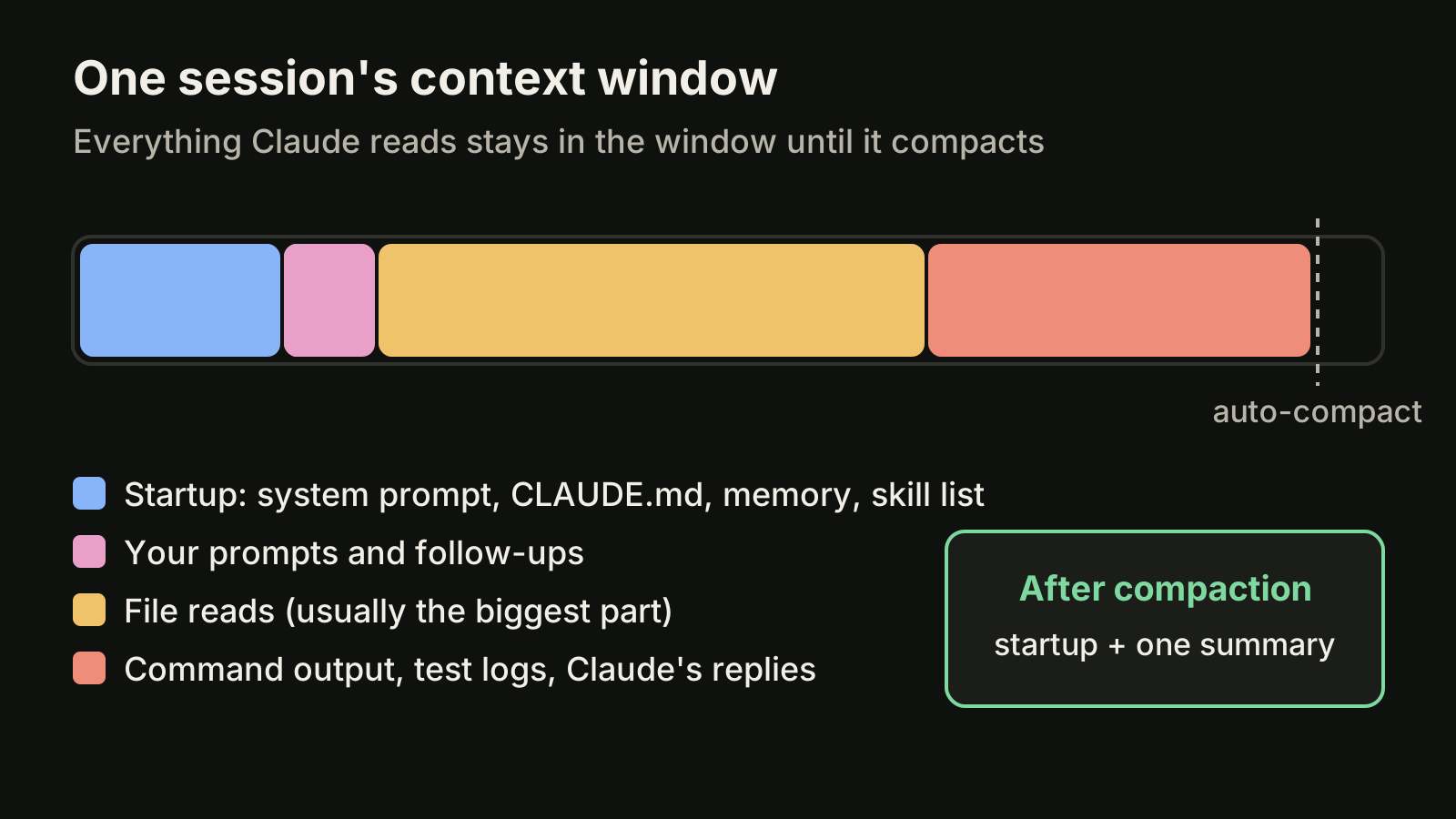
The practical lesson: a vague prompt costs context. "Fix the login bug" invites Claude to read half the auth folder. "Fix the redirect in src/auth/callback.ts after a failed login" reads one file.
Check your own usage with /context
You do not have to guess. Run this at any point in a session:
/contextIt shows a live breakdown of what is using your context by category, with optimization suggestions, including which CLAUDE.md and auto memory files loaded. Run /memory to open and edit those files directly. Checking /context once in a heavy session is the fastest way to find out whether your instructions, your MCP setup or your file reads are the problem.
How big the window is, as of October 2026
Window size depends on the model and, for some models, on your plan. As of October 2026, the model configuration documentation says:
- Fable models, Sonnet 5 and later, and Opus 4.7 and later have a native 1 million token window on the Anthropic API.
- Opus 4.6 and Sonnet 4.6 reach 1 million tokens through a
[1m]variant, for example/model opus[1m]. For Sonnet 4.6 that requires usage credits on every plan; for Opus 4.6 it is included on Max, Team and Enterprise and needs usage credits on Pro. - Models with a native 1M window auto-compact at roughly 967K tokens by default. Opus 4.6 and Sonnet 4.6 without the
[1m]variant compact at a 200K boundary. - Setting
CLAUDE_CODE_DISABLE_1M_CONTEXT=1removes the 1M variants and makes sessions compact at 200K.
Check the model configuration page for your exact model and plan before relying on these numbers. They change.
A larger window delays compaction. It does not change what compaction does, and the docs note that compaction works the same way at the larger limit.
What happens when it fills: compaction
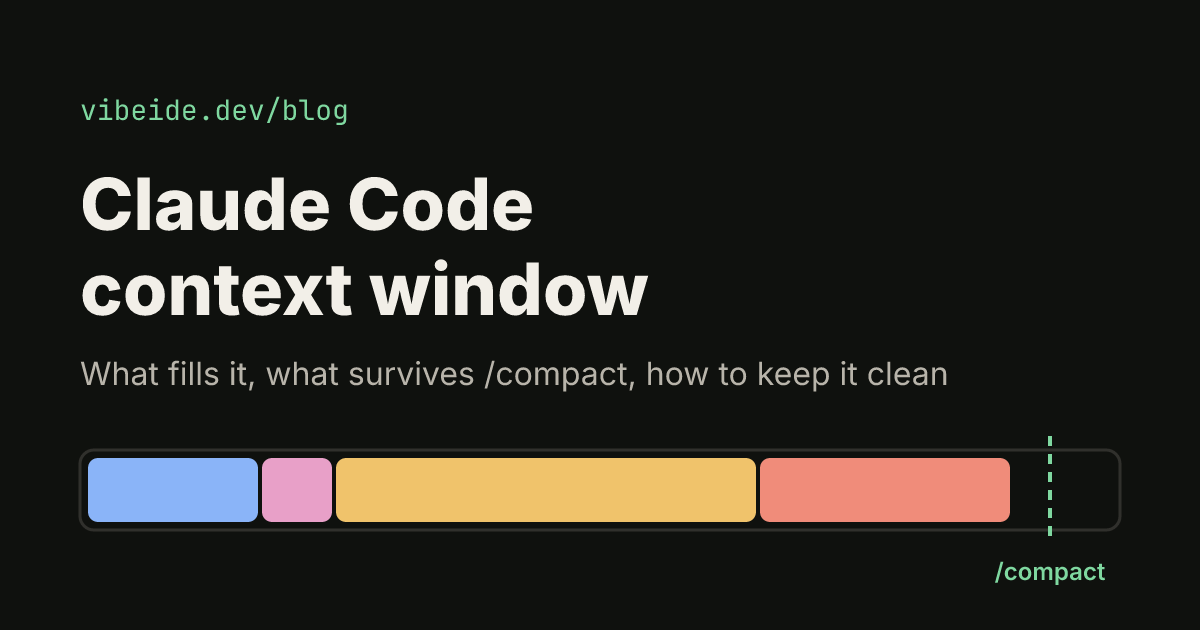
Claude Code compacts automatically as you approach the limit, so a full window does not end your session. Compaction replaces the conversation with a structured summary. The summary keeps your requests and intent, key technical concepts, files examined or modified, errors and fixes, pending tasks and current work. Full tool outputs and intermediate reasoning are gone.
Some things come back from disk afterwards. The documentation lists what happens to each:
| Content | After compaction |
|---|---|
| Project-root CLAUDE.md and unscoped rules | Re-injected from disk |
| Auto memory | Re-injected from disk |
| The plan written in plan mode | Re-injected from disk |
| Files Claude read or edited | Up to five re-read, most recently modified first |
| Skills you invoked | Re-injected, capped at 5,000 tokens per skill and 25,000 in total |
| Path-scoped rules, nested CLAUDE.md | Reload when Claude reads a matching file again |
| The skill listing | Not reloaded |
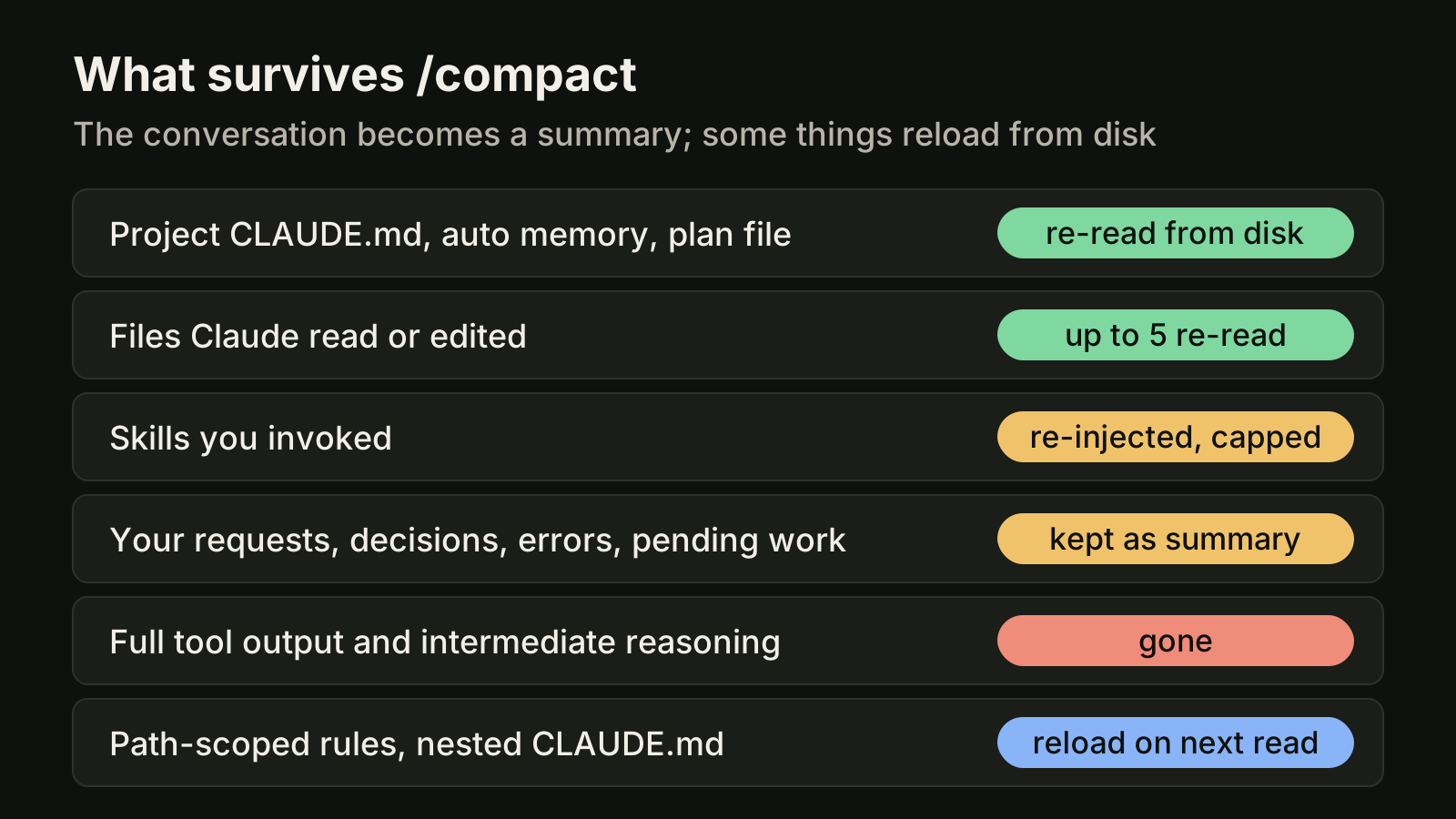
This table explains most of the "it forgot what I asked" moments. A request you typed an hour ago now exists only as a line in a summary. If it was a hard requirement, it should have lived somewhere that is re-read from disk: the project CLAUDE.md, or the plan.
Two practical consequences from the docs:
- If a rule must survive compaction, do not give it
paths:frontmatter. Put it in the project-root CLAUDE.md instead. - Skill bodies are truncated from the end when they exceed the cap, so put the most important instructions near the top of
SKILL.md.
Five ways to keep the context window useful
1. Compact on your terms
Do not wait for the automatic pass. Before starting a new phase of work, compact with a focus:
/compact focus on the auth bug fix and the failing testThe summary then keeps what you chose instead of what the automatic pass guesses is important. To summarize only part of the conversation, run /rewind, pick a message, and choose Summarize from here or Summarize up to here.
2. Move the auto-compact point
If you prefer smaller, more frequent compactions, set the window size yourself:
/autocompact 500kYou can also pass claude --autocompact 500k for one launch, or set CLAUDE_CODE_AUTO_COMPACT_WINDOW. The accepted range is 100K to 1M tokens.
3. Clear between unrelated tasks
/clearOld conversation crowds out the files you need next and costs tokens on every message. If the next task has nothing to do with the last one, start clean. This is the single most effective habit for long working days.
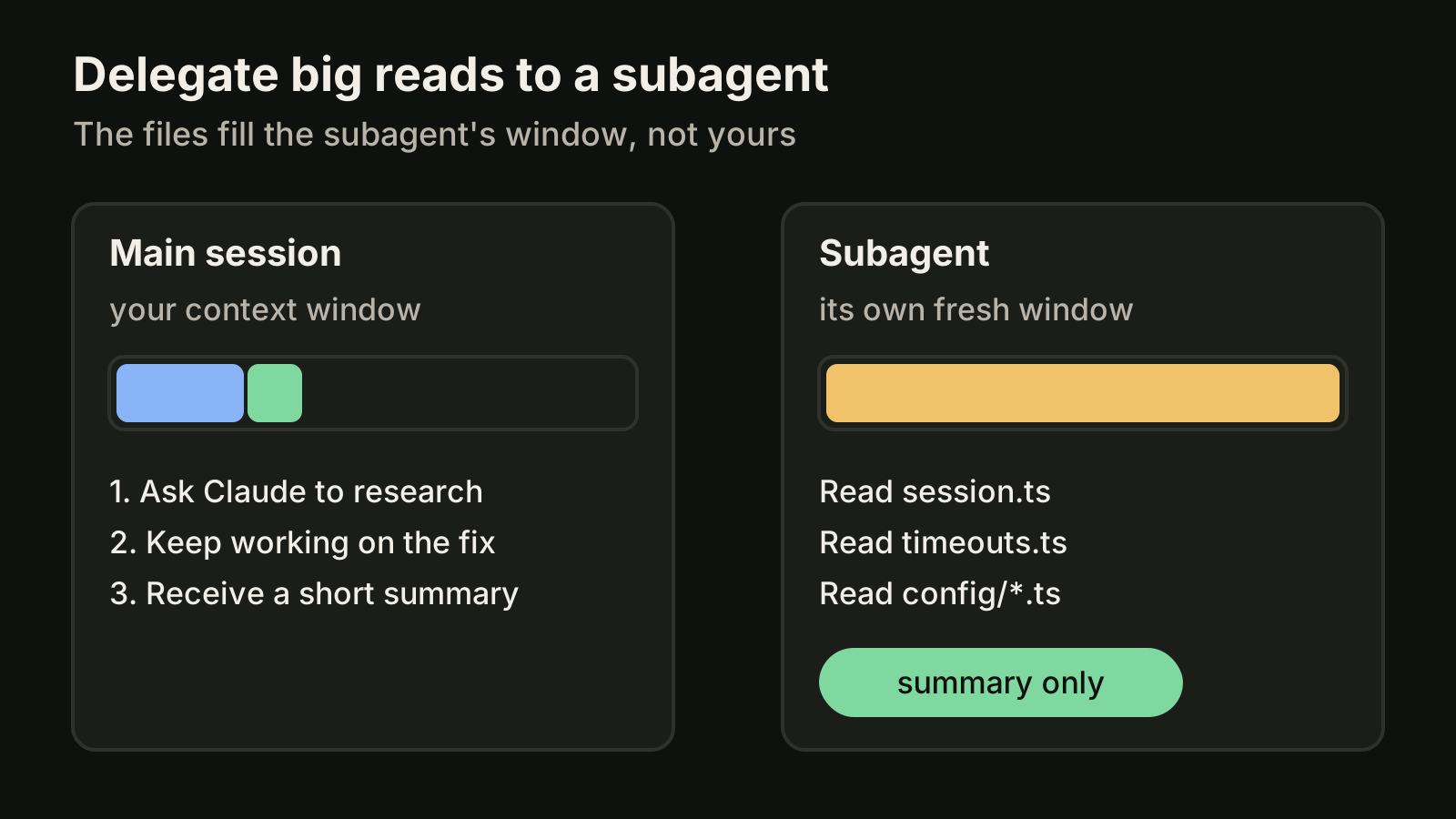
4. Send research to a subagent
When a task needs a lot of reading, ask Claude to use a subagent. The subagent gets its own fresh window, reads the files there, and only its final summary comes back to your session.
5. Keep one task per session
Most context trouble comes from sessions that collect several unrelated requests. Each request drags its files and output along, and by the third task the first one is a summary. One task per session gives each request a clean window, one diff to review, and a conversation you can come back to later. If you run several at once, give each session its own worktree.
Where VibeiDE fits
VibeiDE is a desktop app that coordinates the Codex, Claude Code and OpenCode CLIs you already installed, with your own provider accounts. Claude Code runs in an embedded terminal that shows the original CLI interface, so /context, /compact and /clear work as usual. Each project has its own task queue, so separate requests become separate tasks instead of one long session. Each task keeps its saved provider conversation, so a follow-up can continue that conversation instead of re-explaining the context, and finished tasks wait in Ready for review. See the Claude Code page or how to resume a Claude Code session from its saved task.
Takeaways
- The context window holds everything: startup instructions, your prompts, file reads, command output and replies. File reads are usually the biggest part.
- Run
/contextto see what is actually using space before you change anything. - Compaction keeps a summary, re-reads CLAUDE.md, memory, the plan and up to five recent files, and drops full tool output.
- Put hard requirements where compaction re-reads them: the project-root CLAUDE.md or the plan, not an early chat message.
- Use
/compactwith a focus,/clearbetween tasks, subagents for heavy reading, and one task per session.