CLAUDE.md is the first thing Claude Code reads about your project, in every session. A good one saves you from repeating "we use pnpm" and "tests live in tests/unit" twenty times a week. A bad one is worse than nothing: a 600-line wall of vague advice that eats context and still gets ignored.
This guide covers how Claude Code loads CLAUDE.md files, what to put in them, how to phrase rules so they stick, and what to move out of CLAUDE.md entirely. Details are based on the official memory documentation as of September 2026.
How Claude Code loads CLAUDE.md
There is not one CLAUDE.md, there is a stack. Claude Code reads every file in scope and concatenates them, from the broadest to the most specific:
- Managed policy, set by your organization:
/Library/Application Support/ClaudeCode/CLAUDE.mdon macOS,/etc/claude-code/CLAUDE.mdon Linux,C:\Program Files\ClaudeCode\CLAUDE.mdon Windows. - User memory in
~/.claude/CLAUDE.md, your personal defaults for every project. - Project memory in
./CLAUDE.mdor./.claude/CLAUDE.md, committed to git and shared with the team. - Local project memory in
./CLAUDE.local.md, your personal notes for this repository. Add it to.gitignore.
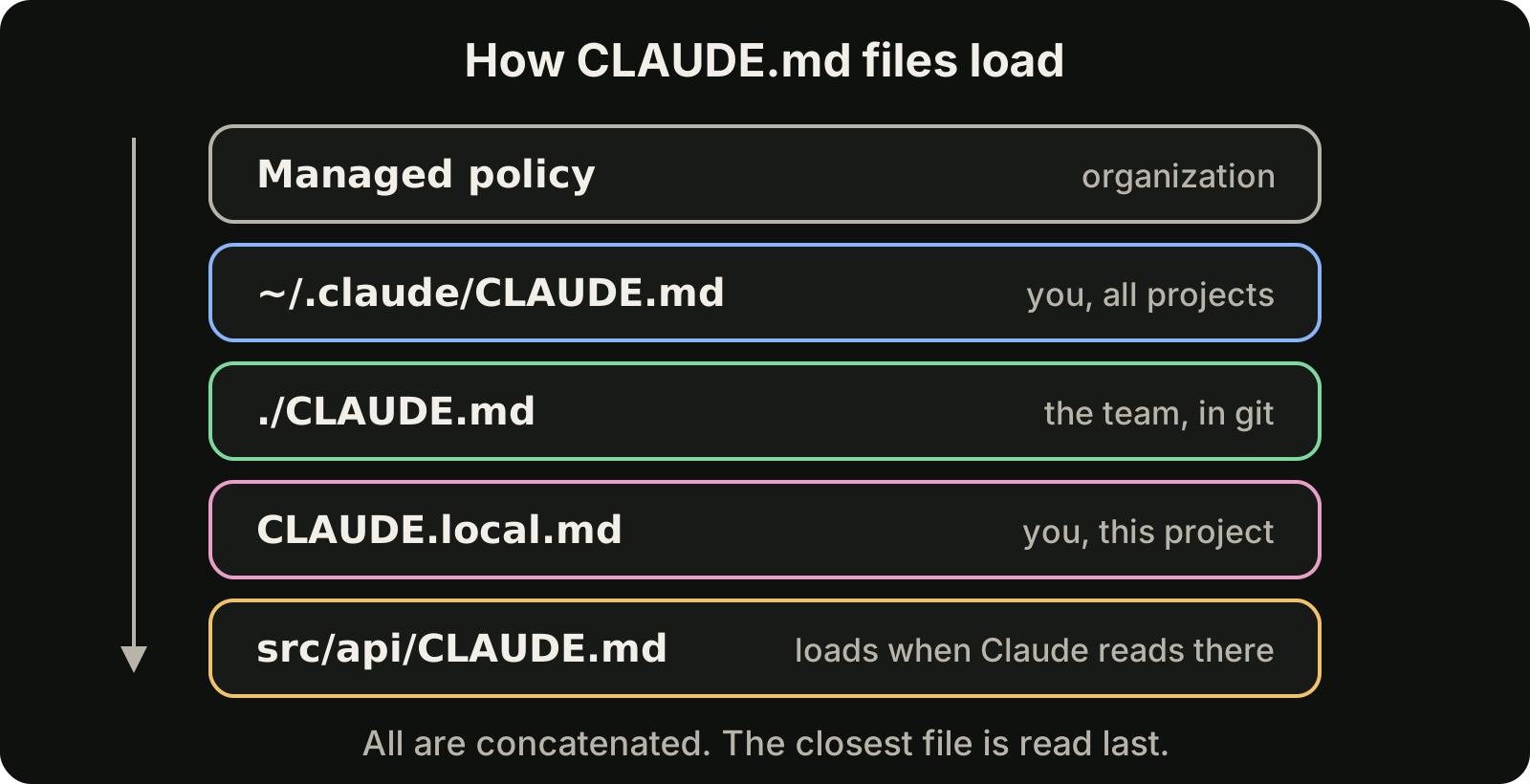
Files in the working directory and above it load when the session starts. CLAUDE.md files in subdirectories load on demand, when Claude reads files in that part of the tree. Because everything is concatenated root down, the file closest to the code is read last, which is where you put the most specific instructions.
Two commands show you what is actually loaded: /memory lists the memory files and lets you open them, and /context shows how much of the context window they take. Our guide to the Claude Code context window explains what else competes for that space and how to keep it small.
What to put in CLAUDE.md
The official guidance is to keep each file under about 200 lines. Everything in CLAUDE.md costs context in every session, so include what Claude needs almost every time and nothing else:
- Commands: how to build, test, lint and run the project. Exact commands, not descriptions.
- Layout: where the important code lives, especially anything non-obvious.
- Conventions: naming, formatting, error handling, patterns the codebase prefers.
- Gotchas: the things that surprise every new contributor, like a generated folder that must not be edited by hand.
- Workflow: how you want changes delivered, for example small commits or a changelog entry for every feature.
A compact example:
# Project notes

## Commands
- Install: `pnpm install`
- Test: `pnpm test` (run before committing)
- Lint: `pnpm lint --fix`

## Layout
- API handlers live in `src/api/handlers/`
- Shared types live in `src/types/`, never redefine them locally
- `src/generated/` is built by `pnpm codegen`; do not edit it

## Conventions
- Use 2-space indentation
- Return typed errors from handlers, do not throw
You do not have to start from a blank page. Run /init in a repository and Claude Code drafts a CLAUDE.md from what it finds. Treat that draft as a starting point: delete the obvious parts and add the gotchas only your team knows.
Be specific or be ignored
The single biggest improvement to most CLAUDE.md files is replacing vague advice with instructions that can be checked. "Format code properly" means something different to every reader. "Use 2-space indentation" means one thing.
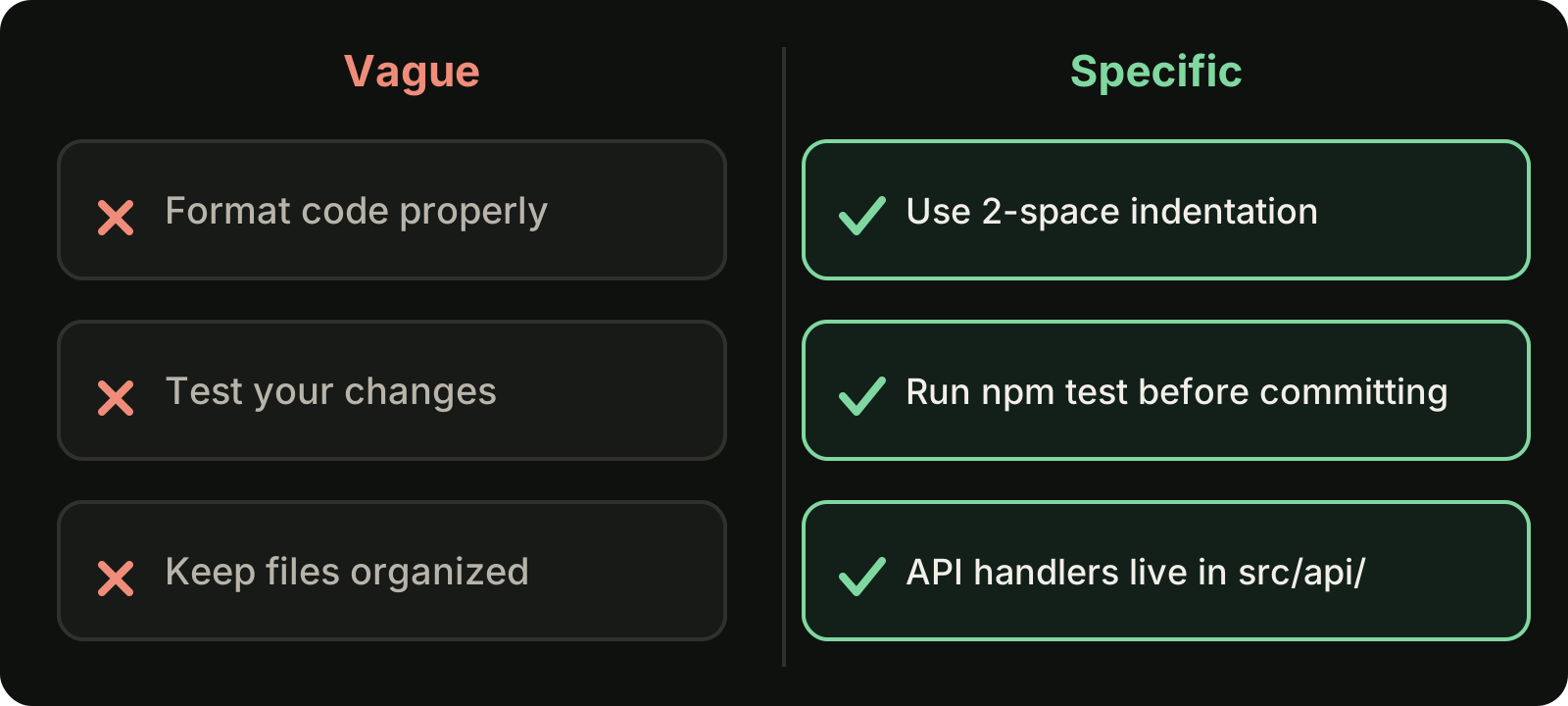
A few rules of thumb:
- Name the command, path or value. "Run
npm testbefore committing" beats "test your changes". - Say why when it is not obvious. "Do not edit
src/generated/, it is overwritten by codegen" prevents the workaround Claude would otherwise invent. - Avoid contradictions. If your user file says "use tabs" and the project file says "use 2 spaces", Claude has to guess. Review all files in the stack together, especially after merging team changes.
- Delete stale rules. An instruction about a library you removed last quarter is noise that competes with the rules that matter.
HTML comments are stripped before the content reaches Claude, so you can leave notes for human maintainers in <!-- --> without spending context on them.
Keep it modular with imports and rules
When one file grows past the point where it is easy to scan, split it rather than letting it sprawl.
Imports. A line like @docs/architecture.md pulls another file into CLAUDE.md. Imports can nest up to four levels deep. This is useful for keeping a long architecture overview in its own file while still loading it.
Path-scoped rules. Files in .claude/rules/ can declare paths globs in their frontmatter, so they only apply when Claude works with matching files:
---
paths:
  - "src/api/**/*.ts"
---
- Validate every request body with the shared schema helpers
- Return errors in the standard `{ error: { code, message } }` shape
API rules stay out of the context when Claude is editing CSS, and test rules only appear when it touches tests. Rules in ~/.claude/rules/ apply to all your projects. If a monorepo contains CLAUDE.md files you do not want loaded, the claudeMdExcludes setting skips them.
Move guarantees and procedures out of CLAUDE.md
CLAUDE.md is context, not enforcement. Claude reads it and usually follows it, but in a long session a rule can lose to everything else in the conversation. The fix is to put each kind of instruction where it works best.
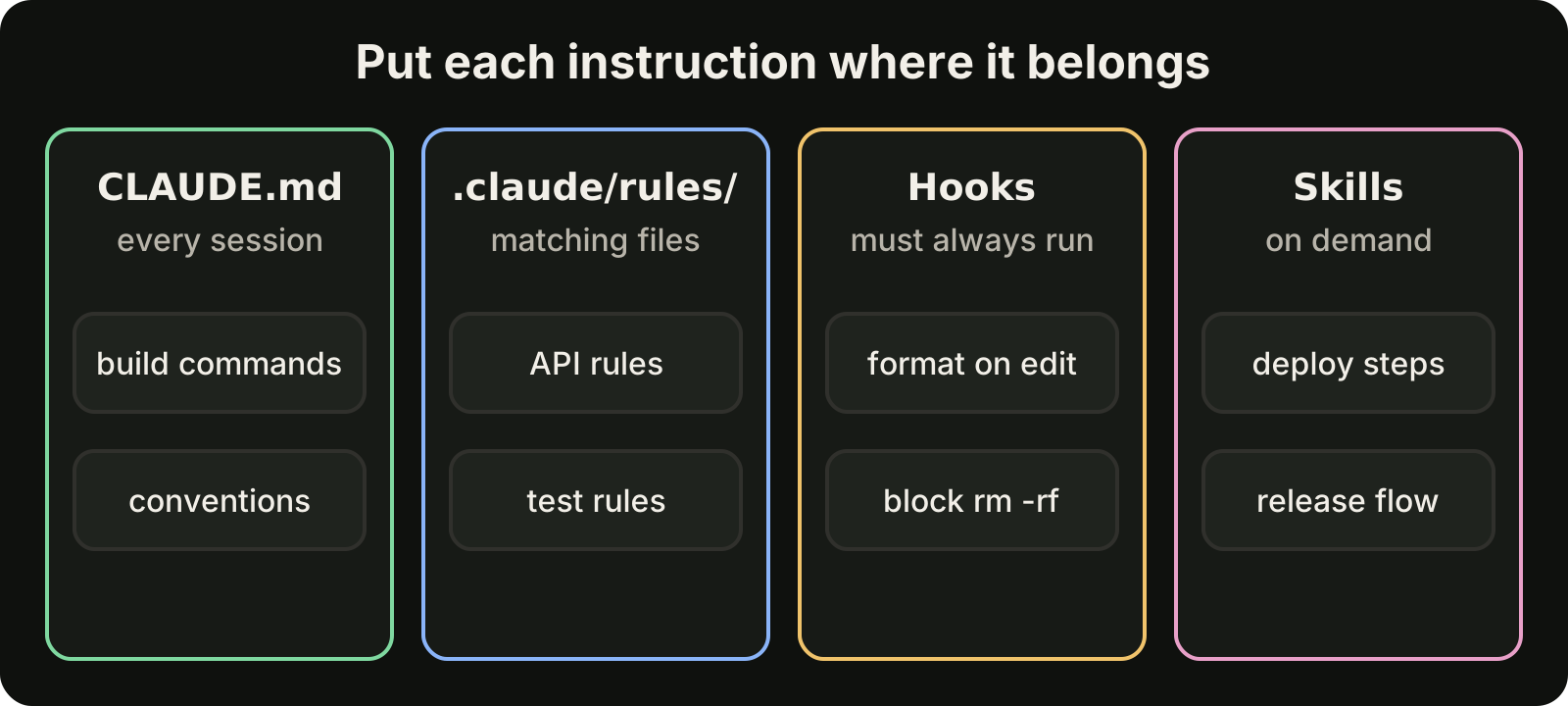
- CLAUDE.md for what every session needs: commands, layout, conventions.
.claude/rules/for rules that only matter for certain files.- Hooks for anything that must happen every time, like formatting after each edit or blocking a dangerous command. Our guide to Claude Code hooks walks through three you can copy.
- Skills for longer procedures used occasionally, like a release checklist, so they load only when needed. Our guide to Claude Code skills shows how to write one.
A good test: if Claude skipping a rule once would cost you real time or data, that rule belongs in a hook.
CLAUDE.md in long sessions
The project-root CLAUDE.md survives /compact: after the conversation is summarized, the file is loaded again, so your core instructions are not lost with the history. Instructions you only typed in chat do not get that treatment. If you find yourself repeating a correction, move it into CLAUDE.md.
Claude Code also keeps an auto memory per project in ~/.claude/projects/<project>/memory/MEMORY.md, where it saves notes it learns along the way. The first 200 lines or 25 KB load at the start of each session. Review it from time to time and promote anything important into your real CLAUDE.md, where the team can see it.
Shorter sessions help too. A session that starts fresh reads CLAUDE.md at the top, with nothing competing for attention. Handing noisy work such as test runs and codebase searches to subagents keeps the main conversation small as well. Planning the task first, as described in our guide to Claude Code plan mode, keeps each session focused on one change.
Sharing instructions with Codex
If your team also uses Codex, you may already have an AGENTS.md. Claude Code can read AGENTS.md directly when a project has no CLAUDE.md or CLAUDE.local.md, and the Project instructions option in /config controls which files it uses. To keep one source of truth while still having a CLAUDE.md, import the shared file with a single line: @AGENTS.md. For how Codex finds and combines those files, see our guide to AGENTS.md for Codex, and for how the two tools differ beyond instructions, see Codex vs Claude Code.
Where VibeiDE fits
VibeiDE is a desktop app that coordinates the Codex, Claude Code and OpenCode CLIs you already installed, with your own provider accounts. Every request gets its own terminal and a fresh session, and tasks queue per project, so each task starts with your CLAUDE.md read from the top instead of buried under hours of earlier conversation. Finished work waits in Ready for review until you mark it reviewed. See the Claude Code page or set it up in about three minutes with a 14-day trial and no card.
Takeaways
- CLAUDE.md is a stack: managed, user, project and local files are concatenated, and the closest file is read last.
- Keep each file under about 200 lines and include only what nearly every session needs.
- Write specific, checkable instructions with exact commands and paths, and remove contradictions and stale rules.
- Split large files with
@imports and path-scoped.claude/rules/. - Put must-happen rules in hooks and occasional procedures in skills.
- Check what loaded with
/memoryand/context.