Codex can call tools from Model Context Protocol (MCP) servers: documentation lookups, browsers, design files, issue trackers and more. You add a server once, and the Codex CLI, the Codex app and the IDE extension all pick it up because they share one configuration. This guide shows the exact codex mcp commands and config.toml keys from the official Codex MCP documentation and the open source Codex CLI, checked in November 2026.
Quick answer: run codex mcp add <name> -- <command> for a local (stdio) server or codex mcp add <name> --url <url> for a remote (Streamable HTTP) server, then start Codex and type /mcp to see the connected servers. Every server is stored as an [mcp_servers.<name>] table in ~/.codex/config.toml, or in .codex/config.toml for one trusted project.
What is MCP in Codex?
MCP is an open protocol that lets Codex use tools and context from outside programs. Codex supports two kinds of servers:
- Stdio servers are local programs that Codex starts itself, from a
commandand itsargs. - Streamable HTTP servers run somewhere else, and Codex reaches them at a
url, optionally with a bearer token or OAuth.
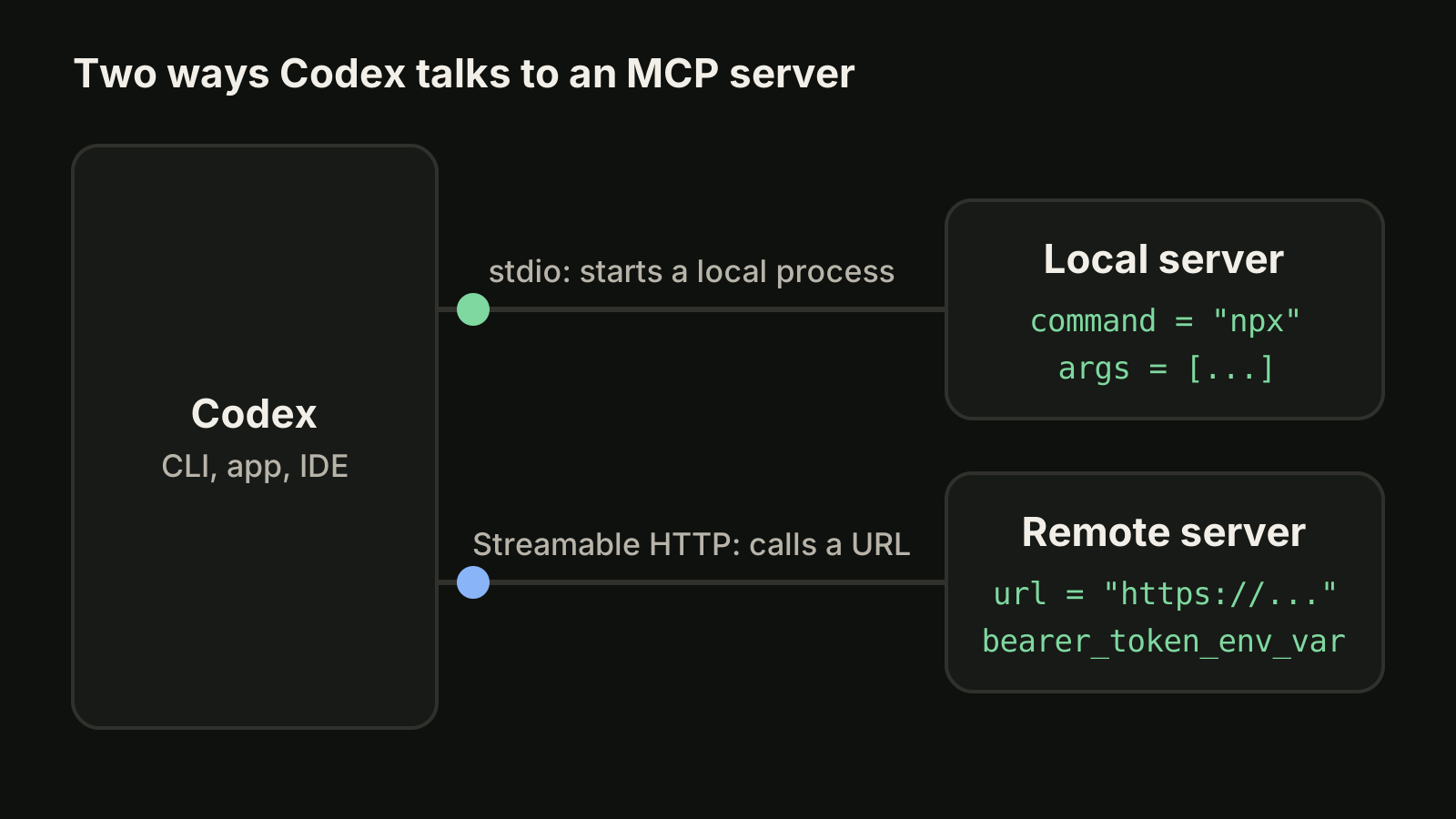
Both kinds end up in the same list, and Codex can call their tools while it works on your task.
How do I add an MCP server to Codex?
Use codex mcp add. The usage line in the Codex source is codex mcp add [OPTIONS] <NAME> (--url <URL> | -- <COMMAND>...): give the server a name, then either a command after -- or a URL, never both.
A local stdio server, here the Context7 documentation server used as the example in the Codex docs:
codex mcp add context7 -- npx -y @upstash/context7-mcpPass environment variables to a stdio server with --env KEY=VALUE. You can repeat the flag, and it only works for stdio servers:
codex mcp add my-db --env DATABASE_URL=postgres://localhost/dev -- npx -y my-db-mcp-serverA remote Streamable HTTP server, with the token read from an environment variable instead of stored in the file:
codex mcp add figma --url https://mcp.figma.com/mcp --bearer-token-env-var FIGMA_OAUTH_TOKENThen start Codex in your project and type /mcp to check that the server connected and see what it offers.
Codex MCP commands
These are the codex mcp subcommands as defined in the Codex CLI source in November 2026:
| Command | What it does |
|---|---|
codex mcp add <name> -- <command> | Adds a stdio server (--env KEY=VALUE sets its environment) |
codex mcp add <name> --url <url> | Adds a Streamable HTTP server (--bearer-token-env-var, OAuth flags) |
codex mcp list | Lists configured servers (--json for JSON output) |
codex mcp get <name> | Shows one server's configuration (--json available) |
codex mcp remove <name> | Removes a server configuration |
codex mcp login <name> | Signs in to a server with OAuth (--scopes, --no-browser) |
codex mcp logout <name> | Removes the stored OAuth credentials for a server |
/mcp (inside Codex) | Shows the connected servers in the current session |
codex mcp list --json is handy in scripts, for example to check in CI that a required server is configured before you run codex exec. Our codex exec guide covers non-interactive runs.
How do I configure MCP servers in config.toml?
Every server lives in a [mcp_servers.<server-name>] table. You can edit the file directly instead of using codex mcp add. The stdio example from the docs:
[mcp_servers.context7]
command = "npx"
args = ["-y", "@upstash/context7-mcp"]
env_vars = ["LOCAL_TOKEN"]

[mcp_servers.context7.env]
MY_ENV_VAR = "MY_ENV_VALUE"
env sets variables for the server process, and env_vars forwards variables that already exist in your shell by name. The Streamable HTTP example:
[mcp_servers.figma]
url = "https://mcp.figma.com/mcp"
bearer_token_env_var = "FIGMA_OAUTH_TOKEN"
http_headers = { "X-Figma-Region" = "us-east-1" }
The keys you will use most, as listed in the docs in November 2026:
| Key | Applies to | What it does |
|---|---|---|
command, args | stdio | Program and arguments that start the server |
env, env_vars | stdio | Set variables, or forward existing ones by name |
cwd | stdio | Working directory for the server |
url | HTTP | Address of the Streamable HTTP server |
bearer_token_env_var | HTTP | Environment variable holding the bearer token |
http_headers, env_http_headers | HTTP | Static headers, or headers read from variables |
startup_timeout_sec | both | Seconds allowed for startup (default 10) |
tool_timeout_sec | both | Seconds allowed for one tool call (default 60) |
enabled | both | false turns a server off without deleting it |
required | both | true makes startup fail if the server cannot start |
enabled_tools, disabled_tools | both | Allow list and deny list for the server's tools |
Keep secrets out of the file where you can. bearer_token_env_var, env_vars and env_http_headers all read values from your environment, so the config can be committed without the token.
Global or project config?
Codex reads MCP servers from two places. ~/.codex/config.toml is the default and applies to every project. A .codex/config.toml file inside a repository adds servers for that project only, and the docs state that it works only in trusted projects.
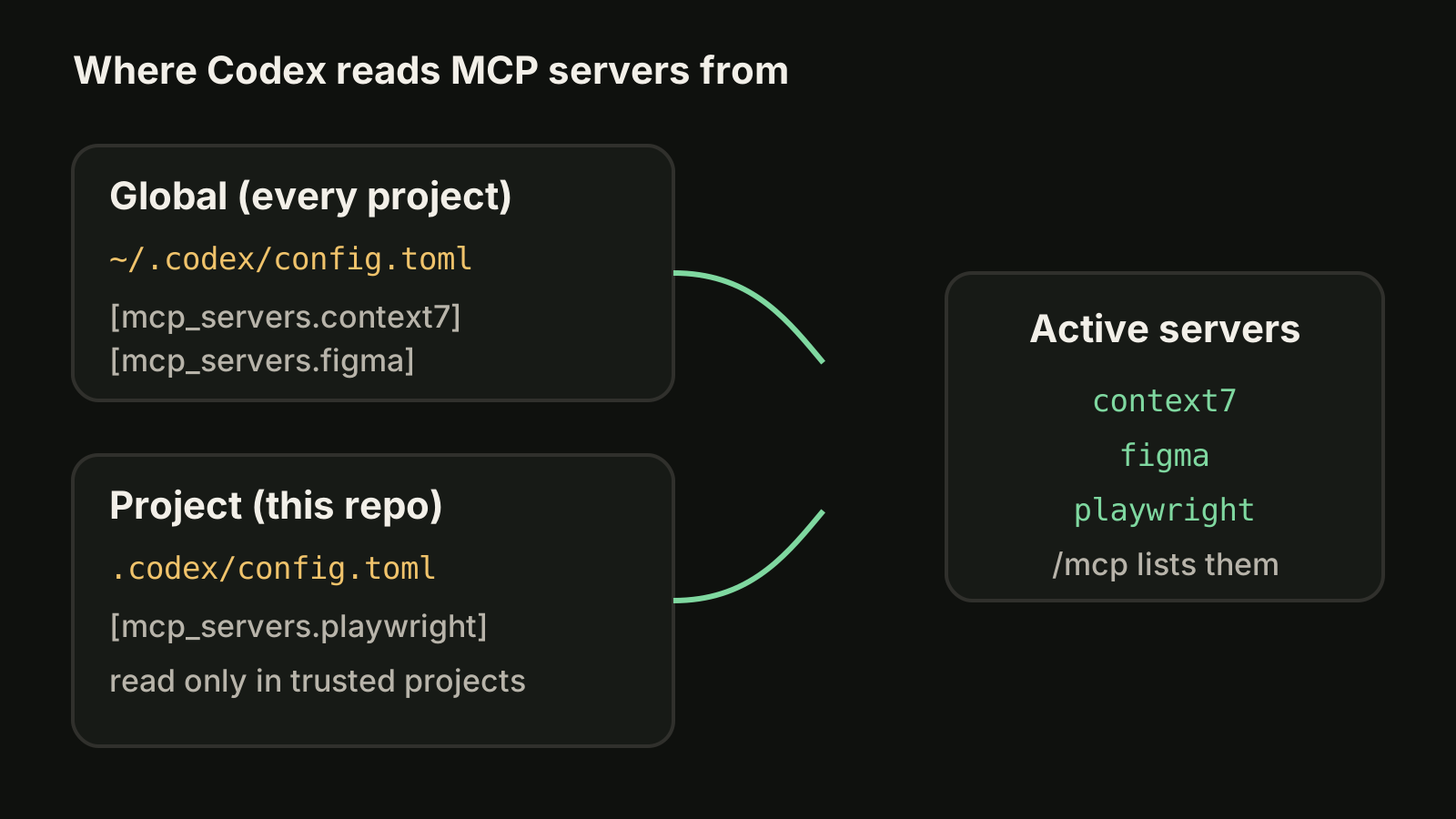
A good split: personal tools such as a documentation server go in the global file, and tools the whole team needs for one repository (a browser for end-to-end tests, the project's issue tracker) go in the project file, committed next to your AGENTS.md. Our guide to AGENTS.md for Codex covers the instruction side of the same setup.
How do I log in to an MCP server with OAuth?
Many remote servers use OAuth instead of a static token. Run codex mcp login <server-name> and finish the sign-in in your browser. On a machine without a browser, --no-browser prints the authorization URL and lets you paste the callback URL back. --scopes read,write overrides the scopes for one login.
If the server needs a pre-registered OAuth client, add it with the client id:
codex mcp add example --url https://mcp.example.com --oauth-client-id my-clientThe docs say the default callback is http://127.0.0.1/callback, and that the top-level mcp_oauth_callback_port and mcp_oauth_callback_url settings fix the port or URL when a server only accepts a specific redirect. codex mcp logout <server-name> removes the stored credentials.
How do I limit which MCP tools Codex can use?
A server can expose far more tools than you want an agent to call. Two keys narrow the list: enabled_tools is an allow list, and disabled_tools is a deny list that the docs say is applied after enabled_tools.
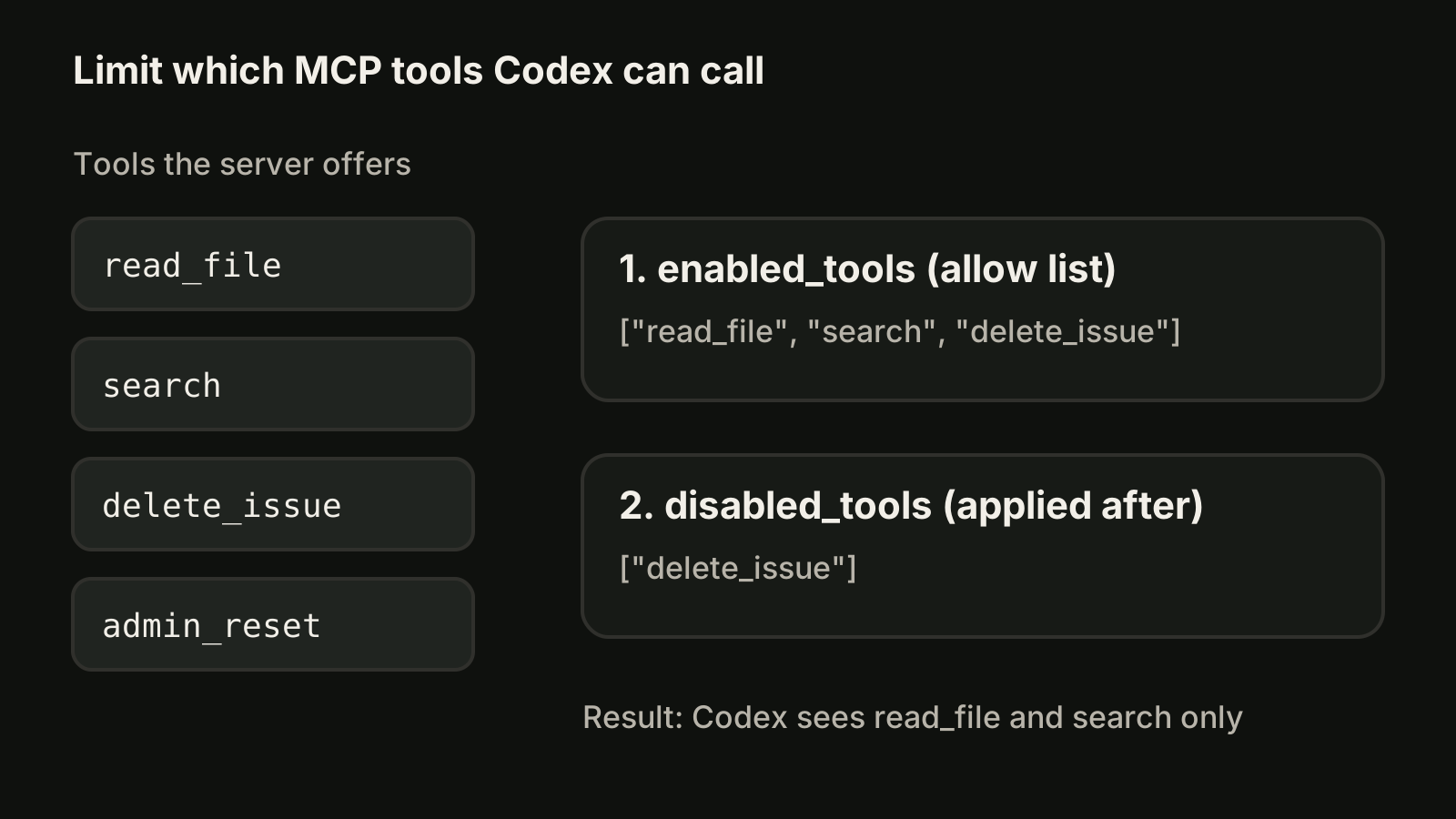
[mcp_servers.tracker]
url = "https://mcp.example.com/mcp"
enabled_tools = ["read_file", "search", "delete_issue"]
disabled_tools = ["delete_issue"]
For approvals, the docs list default_tools_approval_mode per server (values auto, prompt, writes or approve) and a per-tool override under tools.<tool>.approval_mode. tools.<tool>.output_token_limit caps how much one tool's output can add to the context. MCP tools sit next to Codex's own sandbox and approval settings, which our Codex sandbox guide explains.
Fix common Codex MCP problems
| Symptom | What to try |
|---|---|
Server missing from /mcp | Run codex mcp list and check the name; a project server needs a trusted project |
| Server times out at startup | Raise startup_timeout_sec; the first npx run may be downloading the package |
| Slow tool calls fail | Raise tool_timeout_sec for that server |
| Codex refuses to start | A server marked required = true failed; fix it or set required = false |
| 401 from an HTTP server | Check that the variable in bearer_token_env_var is set in the shell that starts Codex, or run codex mcp login |
| You want it off for a while | Set enabled = false instead of deleting the table |
A useful first check for any stdio server is to run its command and args by hand in the same shell. If it fails there, it will fail inside Codex too.
Can Codex run as an MCP server?
Older guides show Codex started as an MCP server so another agent can call it, with tools named codex and codex-reply. OpenAI's own cookbook now marks that Codex MCP server as deprecated and kept for existing integrations, so for new automation look at codex exec or the Codex SDK instead.
One MCP setup, several agents
If you also use Claude Code, you will configure many of the same servers there. Our Claude Code MCP guide covers its claude mcp add commands and scopes, and Codex vs Claude Code compares the two CLIs. VibeiDE is a desktop app that coordinates the Codex, Claude Code and OpenCode CLIs you already installed, so each CLI keeps its own MCP configuration; Codex runs in an embedded terminal with its original interface. Each project has its own task queue, and finished tasks wait in Ready for review. See the Codex page or start a 14-day trial, without a card, from the download page.
Common questions
How do I add an MCP server to Codex CLI?
Run codex mcp add <name> -- <command> for a local server or codex mcp add <name> --url <url> for a remote one. Then type /mcp inside Codex to confirm it connected.
Where is the Codex MCP config file?
In ~/.codex/config.toml, under [mcp_servers.<name>] tables. A project can add servers in .codex/config.toml, which Codex reads only for trusted projects.
Does Codex support remote MCP servers?
Yes. Codex supports Streamable HTTP servers through the url key, with a bearer token from bearer_token_env_var, custom headers or OAuth via codex mcp login.
How do I disable an MCP server in Codex without deleting it?
Set enabled = false in that server's table. To hide only some tools, use enabled_tools or disabled_tools.
Do the Codex app and IDE extension use the same MCP servers?
Yes. The docs state that the desktop app, the CLI and the IDE extension share the same configuration.
Takeaways
- Add servers with
codex mcp add: a command after--for stdio,--urlfor Streamable HTTP. codex mcp list,get,remove,loginandlogoutmanage them;/mcpshows what is connected.- Servers live in
[mcp_servers.<name>]tables in~/.codex/config.tomlor a trusted project's.codex/config.toml. - Read tokens from environment variables with
bearer_token_env_var,env_varsandenv_http_headers. - Narrow tools with
enabled_tools, thendisabled_tools; set approvals per server or per tool. - Raise
startup_timeout_secortool_timeout_secfor slow servers, and useenabled = falseto pause one. - Install Codex first with our Codex CLI install guide.